- SEO friendly URLs use short, lowercase, hyphenated words inside a logical folder, but Google calls URL words a very lightweight ranking factor.
- Clean URLs pay off in crawling, clicks, one canonical version per page, and AI citations, where natural-language slugs were cited 89.78% vs 81.11%.
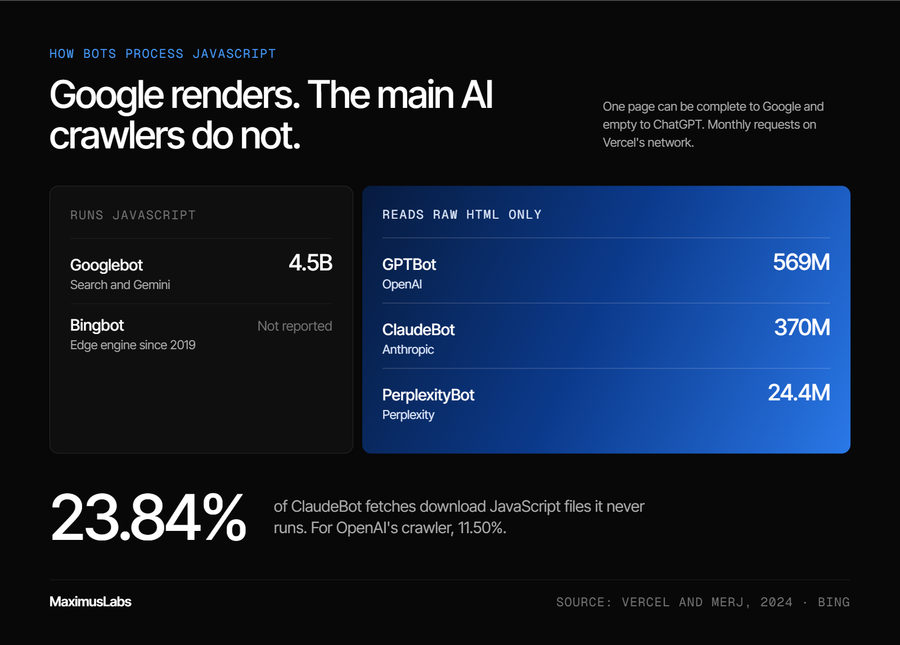
- AI crawlers waste about a third of fetches on 404s and do not render JavaScript, so stable, server-rendered URLs matter more than ever.
- Use keywords in new slugs of roughly 17 to 40 characters, but do not rewrite live URLs just to add keywords.
- Prefer subfolders, strip tracking parameters, enforce one version of every page, and use 301 redirects kept for at least a year.
- Migrate large sites in tested stages, move pipeline pages last, and audit URLs quarterly across format, errors, rendering, and recrawl.
Picture a Head of Growth with a spreadsheet of 400 blog URLs. Column B holds the "new, keyword-rich" version of each one. The dev team has a ticket ready. The plan is to ship every change on a Friday, right before the quarterly board review.
The question nobody has asked is simple: which of these pages bring in pipeline today? Many of those URLs carry years of backlinks. Renaming them resets that trust for a ranking gain Google itself calls tiny.
That spreadsheet is the real story of SEO friendly URLs. The rules are simple. The damage comes from applying them at the wrong time, to the wrong pages, for the wrong reason. And now there is a second reader for every URL you publish: the AI engines (ChatGPT, Perplexity, Gemini, and Google AI Overviews) deciding which page becomes the answer.
This guide covers the 11 best practices, the honest weight behind each one, and how to apply them without breaking what already works.
Q1. What is an SEO friendly URL, and how much does it really affect rankings?
An SEO friendly URL is a short, readable web address that uses lowercase words separated by hyphens. It sits inside a folder that reflects the site's structure, such as /blog/seo-friendly-urls. Google describes words in a URL as a very lightweight ranking factor that matters less once a page is indexed. The real payoff is clean crawling, one canonical version per page, readable breadcrumbs, and better odds of being cited by AI engines.
What makes a URL "friendly"
✅ Readable by people and machines
Google's own guidance is plain. Use readable words instead of long ID numbers, and separate those words with hyphens [1]. A URL like example.com/pets/cats tells a reader what the page covers before they click. A string of random characters tells them nothing.
Google's starter guide makes the same point with its own example. It contrasts a descriptive path with a string of random identifiers and calls the second one less helpful for users [2].
The anatomy of a URL
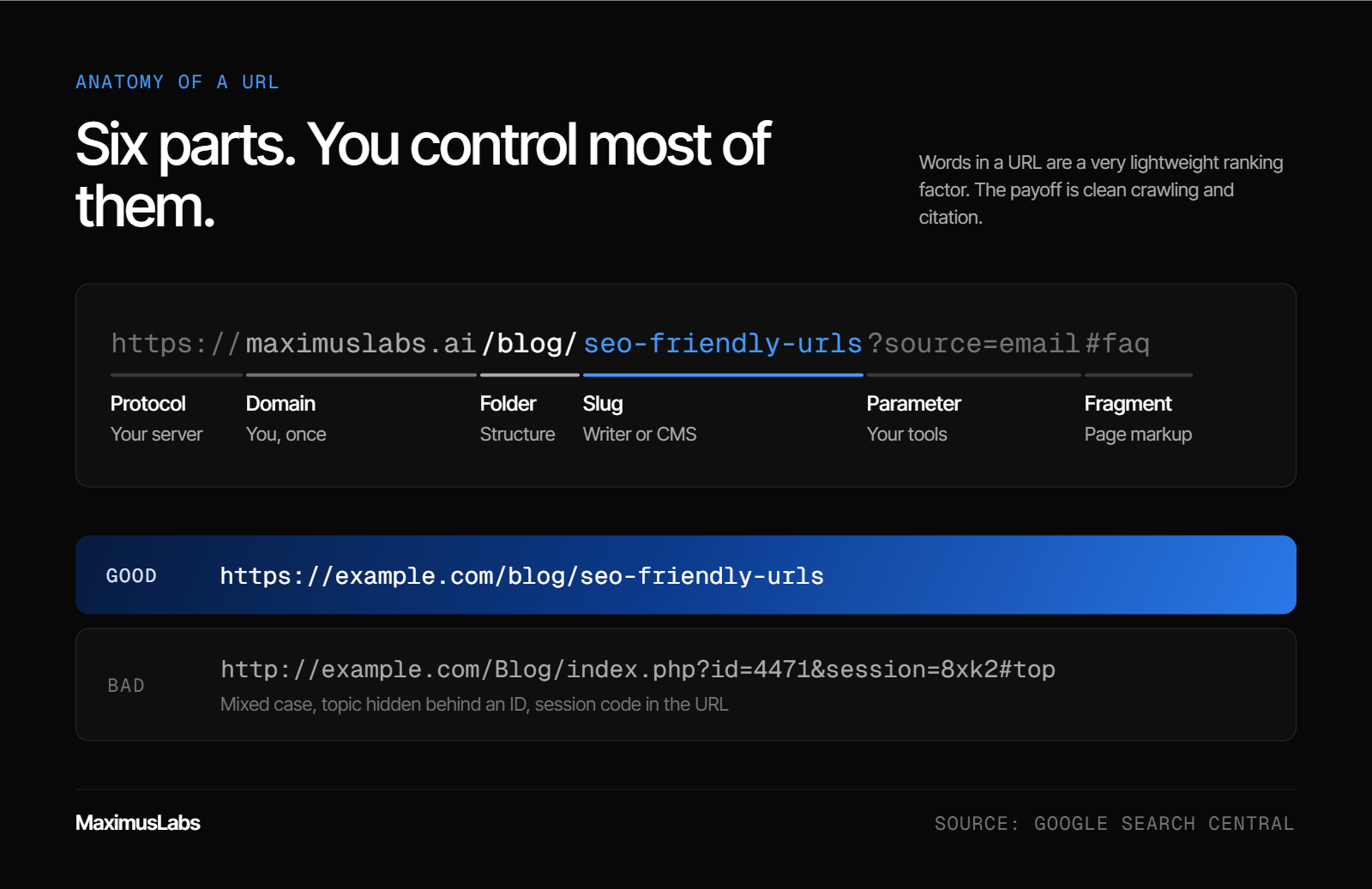
Every URL is built from the same parts. You control most of them.
| Part | Example | What it does | Who controls it |
| Protocol | https:// | Secures the connection | Your server |
| Domain | maximuslabs.ai | Names the site | You, once |
| Folder | /blog/ | Groups related pages | Your site structure |
| Slug | seo-friendly-urls | Names the page | Your writer or CMS |
| Parameter | ?source=email | Passes tracking or filter data | Your tools |
| Fragment | #faq | Jumps to a section on the page | Your page markup |
✅ Good vs bad, side by side
- Good: https://example.com/blog/seo-friendly-urls
- Bad: http://example.com/Blog/index.php?id=4471&session=8xk2#top
The bad version mixes upper and lower case, hides the topic behind an ID, and carries a session code. Each of those creates a separate problem, which later sections cover one by one.
How much URLs actually move rankings
⚠️ The honest weight
Here is the part most checklists skip. Google's John Mueller has called words in a URL a "very very lightweight factor" [3]. He added that the signal matters even less after Google has indexed the content. URLs help Google guess a topic before it reads the page. After that, the page content does the heavy lifting.
So URLs are not a growth lever. They are hygiene. Bad hygiene costs you, but good hygiene alone will not lift a weak page.
💰 Where URLs pay off
The return shows up in four places:
- Crawling: clean paths waste fewer search engine visits on duplicates.
- Clicks: Google can show URL words as breadcrumbs in results, which helps people judge a result [2].
- Consolidation: one URL per page keeps links and trust in one place.
- Citations: AI engines read the URL when deciding which page to cite, which Q2 covers with data.
I think of URLs the way I think of a clean warehouse label. The label does not make the product better. But a mislabeled box never gets shipped.
MaximusLabs AI treats URL rules as the floor of Answer Engine Optimization (AEO), the work of getting a brand cited inside AI answers. SEO best practice is the foundation, and AEO is the building on top. Every MaximusLabs engagement starts with that foundation, and the work is measured on pipeline, not on rankings.
Q2. Do URLs matter for ChatGPT, Perplexity and Google AI Overviews?
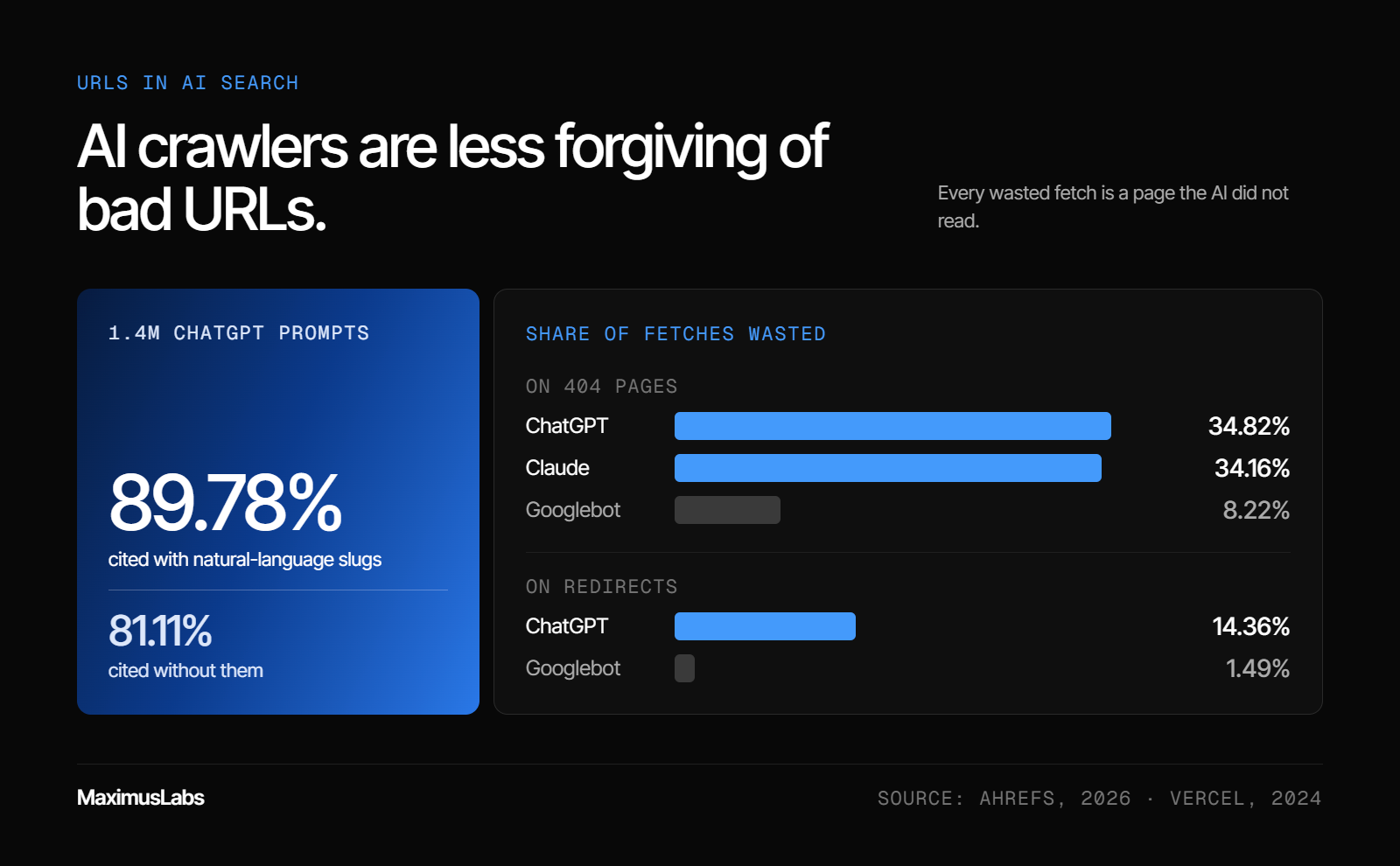
Yes. Ahrefs studied 1.4 million ChatGPT prompts and found results with natural-language URL slugs were cited 89.78% of the time, versus 81.11% for results without them [4]. AI crawlers also handle broken paths poorly, spending far more fetches on 404 pages and redirects than Googlebot. MaximusLabs AI checks every target page for a crawlable, stable, descriptive URL before optimizing its content for AI citation.
The situation: clicks are no longer the prize
📉 What happened to the blue link
For years, the URL had one job. It helped a page rank and earn a click. That job is shrinking.
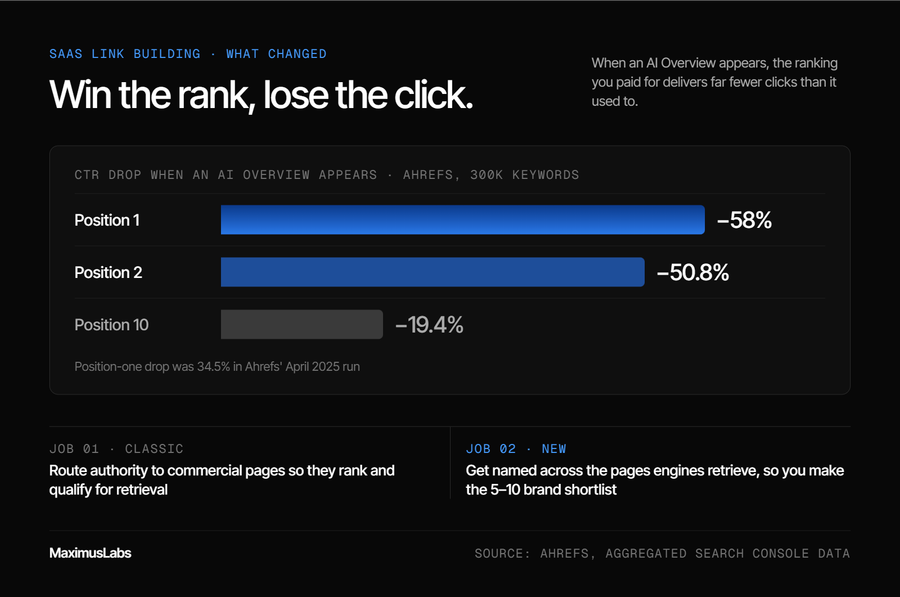
Pew Research Center tracked 900 U.S. adults across 68,879 Google searches in 2025. When an AI summary appeared, users clicked a traditional result in only 8% of visits [6]. Without a summary, that figure was 15%. Only 1% of visits included a click on a link inside the summary itself.
The lesson is blunt. If the answer is given on the results page, being the cited source matters more than being the tenth blue link.
The complication: AI reads your URL differently
⚠️ How AI engines pick a page
Tools like ChatGPT use retrieval-augmented generation (RAG). That means the AI runs a live search, reads the results, and then writes an answer with citations. It also splits one question into several smaller "fan-out" queries.
Ahrefs found ChatGPT cited only about half of the URLs it retrieved [4]. Cited page titles matched those fan-out queries closely, with a similarity score of 0.656. Skipped pages scored 0.484. The URL slug is part of that first impression.
Semrush analyzed 378,000 URL citations from ChatGPT Search and Google AI Mode in 2026 [5]. Slugs of 17 to 40 characters outperformed very short and very long slugs. The study shows correlation, not cause, so treat it as a guide.
❌ AI crawlers waste more on bad URLs
Vercel's analysis of AI crawler traffic across its network, published in December 2024, shows a wide gap between Googlebot and AI bots [11]:
| Crawler | Fetches spent on 404 pages | Fetches spent on redirects |
| ChatGPT (OpenAI crawlers) | 34.82% | 14.36% |
| Claude (Anthropic crawlers) | 34.16% | Not reported |
| Googlebot | 8.22% | 1.49% |
In plain terms, about one in three ChatGPT fetches hits a dead end. Every wasted fetch is a page the AI did not read.
The resolution: fundamentals now serve two readers
✅ No special AI tricks required
Google says there are no additional requirements to appear in AI Overviews or AI Mode [7]. A page must be indexed and eligible to show a snippet. Google also says no special schema or AI text files are needed.
That is good news. The same clean, stable URL serves Google and AI engines at once. You do not need a second URL strategy.
💡 My read on it
I might be reading the Ahrefs gap too strongly. An eight-point difference is not a miracle. But in a game where AI names only five to ten brands, small edges decide who makes the list.
MaximusLabs AI treats URL hygiene as the retrieval layer of AEO. A page that AI cannot fetch cleanly cannot become the answer. That discipline is part of why Oliv AI reached a "64% AI citation rate in 6 months, vs ~30% for billion-dollar incumbents (Oliv AI)", and MaximusLabs measures that work on pipeline, not mentions.
Q3. What are the 11 best practices for SEO friendly URLs?
The 11 best practices are: use readable words, separate them with hyphens, keep every character lowercase, keep slugs to about 3 to 5 words, include the primary keyword once, drop stop words and dates, use logical subfolders, avoid tracking parameters and session IDs, serve one canonical HTTPS version, use 301 redirects when a URL changes, and keep URLs stable once indexed.
Why a checklist beats rules of thumb
⏰ Decisions happen fast
Most URL mistakes are not made by SEO teams. They are made by a writer naming a draft, or a developer launching a feature at 6 p.m. A checklist gives those people a rule they can apply in ten seconds.
Google's URL guidance is the base for most of these rules [1]. The order below reflects impact on crawling and AI citation, not how often blogs repeat them.
The 11 practices, in order of impact
- Use readable words. Google recommends words over long ID numbers [1].
- Separate words with hyphens. Google reads a hyphen as a space between words.
- Keep every character lowercase. Google treats URLs as case sensitive [1].
- Keep slugs short. Aim for 3 to 5 words, about 17 to 40 characters [5].
- Include the primary keyword once. It helps readers and retrieval, but adds little ranking weight [3].
- Drop stop words and dates. Words like "the" and "of" add length, and dates make content look stale.
- Use logical subfolders. Paths like /blog/topic group related pages and feed breadcrumbs [2].
- Avoid tracking parameters and session IDs. Each one can create a duplicate copy of the page.
- Serve one canonical HTTPS version. Choose one host, one slash rule, and one case.
- Use 301 redirects when a URL changes. A 301 tells engines the move is permanent.
- Keep URLs stable once indexed. Change a live URL only when the page itself has changed.
⚠️ How to read this list
Practices 1 to 7 apply to every new page you publish. Practices 8 to 11 protect pages that already earn traffic. Breaking the second group usually costs more than skipping the first.
💡 Where teams go wrong
The pattern I see most often is a team that nails practices 1 to 6 and then ignores 8 and 9. Their slugs look perfect. Meanwhile, their analytics tags spin up hundreds of parameter copies of every page.
⭐ A ten-second test for any new URL
Read the URL out loud to a colleague. If they can guess the page topic, it passes. If they need to open the page to find out, it fails. Then check three things before you hit publish:
- Is every letter lowercase, with hyphens between words?
- Is there a folder that matches where the page lives in your navigation?
- Is there anything after a question mark that does not change the content?
The next five sections expand these rules. Q4 covers formatting, Q5 covers keywords, Q6 covers folders, Q7 covers duplicates, and Q8 covers redirects.
MaximusLabs AI builds this checklist into its content process, so every new page ships with a clean URL from day one. That keeps fixes off the developer backlog, and it leaves the team time for pages that drive pipeline.
Q4. How should you format a URL slug: hyphens, case, length and stop words?
Use hyphens, not underscores or plus signs, because Google reads hyphens as breaks between words. Use only lowercase letters: Google treats URLs as case sensitive, and many servers serve /Products/ and /products/ as two separate pages. Aim for slugs of about 17 to 40 characters, the range Semrush found AI engines cite most often. Cut stop words and dates that add length without adding meaning.
Hyphens, not underscores
✅ The rule
Google recommends hyphens to separate words in a URL [1]. Underscores are often used in code to join terms that belong together. So seo_friendly_urls can be read as one long word, while seo-friendly-urls reads as three.
The fix is a one-time CMS setting. Most platforms let you set the word separator for all new slugs. Check it once, and every future page inherits the rule.
Case sensitivity is a server problem
⚠️ Why "it looks the same" is not enough
Google treats URLs as case sensitive [1]. On many Linux and Apache servers, /Products/ and /products/ load as two different pages. That splits links and creates a duplicate that nobody meant to publish.
The Art of SEO by Eric Enge describes this exact trap, and the fix is to enforce lowercase at the server [8]. A server rule can redirect any uppercase request to its lowercase version. That way, a stray capital letter in a link never creates a new page.
Length: use data, not folklore
📊 What the numbers say
You will find blogs quoting 60, 75, or 115 characters as the limit. I have not seen a primary source for any of them. The best data I know comes from Semrush's 2026 study of AI citations [5]. Slugs of 17 to 40 characters outperformed both extremes, and 21 to 25 characters drew the most citations.
That works out to about three to five words. Short enough to read at a glance, long enough to say what the page is.
Stop words and dates
❌ What to cut
Stop words are small filler words like "a," "the," "and," and "of." They rarely change meaning, so cut them. Dates are riskier. A slug with /2023/ makes a refreshed article look old and forces a URL change when you update it.
Here is an illustrative before and after for this very article:
| Before | After | Why it is better |
| /blog/2023/05/the-11-best-practices-for-creating-seo_friendly_URLs | /blog/seo-friendly-urls | No date, no stop words, no underscores, no capitals |
| /p?id=4471 | /blog/url-structure | Readable words replace an ID |
| /Blog/How-To-Use-Hyphens-And-Underscores-In-URLs-Guide | /blog/hyphens-vs-underscores | Lowercase and 25 characters |
💡 The deeper point
"Make URLs pretty" is weak advice. The real reasons are mechanical: word parsing, case duplicates, and slugs that break on update. Once a team understands the mechanics, they stop arguing about style.
MaximusLabs AI applies these formatting rules inside its technical SEO checks, which include clean HTML and AI crawler access. A short slug fix today prevents a redirect project next year, and MaximusLabs ties that saved effort back to pipeline pages.
Q5. Should you put keywords in URLs, and should you change old URLs to add them?
Include the primary keyword once in every new URL, so users, Google, and AI retrieval systems know what the page answers. Do not rewrite indexed URLs just to add keywords. Google's John Mueller has advised against these projects: the site takes at least a temporary hit, and the best case is regaining the old rankings. Change a live URL only when the page's topic has truly changed.
The situation: keywords on new pages still help
✅ Match the slug to the question
For a new page, a keyword in the slug is cheap and useful. It tells a reader what to expect, and it gives Google a hint before it reads the content [3]. It also helps AI engines that match pages against narrow sub-questions.
Ahrefs found ChatGPT favors pages whose titles closely match its fan-out queries, the smaller questions it generates from one prompt [4]. A slug like /blog/hyphens-vs-underscores matches a real sub-question. A slug like /blog/url-tips-part-3 matches nothing.
⚠️ One keyword, not five
Keyword stuffing means repeating search terms to game rankings. In a URL, it looks like /seo-urls/seo-friendly-urls-seo-url-best-seo-tips. It reads as spam to people, and it adds no ranking value. Use the primary keyword once, in plain words, and stop there.
The complication: rewriting live URLs backfires
❌ Why the "keyword refresh" project fails
Here is where good intentions cause real damage. A team audits its blog, finds slugs without keywords, and renames them in bulk. Every renamed page now needs a redirect, every backlink points to an old address, and Google has to process each change again.
The Art of SEO by Eric Enge summarizes Mueller's view on this clearly [8]. Keywords in URLs carry minimal SEO impact, and these changes are not worth it. You take at least a temporary hit, and the best outcome is getting back to where you started.
💸 The real cost
Think about the math. You spend developer time, accept a dip in traffic, and risk broken redirects. In return, you gain a signal Google calls "very very lightweight" [3]. That trade rarely makes sense for a page already bringing in pipeline.
The resolution: a simple change-or-keep test
⭐ Ask four questions before renaming
| Question | If yes | If no |
| Has the page's topic changed? | Consider a new URL | Keep the URL |
| Is the URL broken, duplicated, or full of parameters? | Fix it with a 301 | Keep the URL |
| Does the page earn little traffic and no links? | Low risk to change | High risk to change |
| Are you merging two pages into one? | Redirect the weaker one | Keep both URLs |
If every answer is "no," leave the URL alone. Spend the effort on the content instead.
💡 My contrarian take
Most checklists tell you to put keywords in your URLs. That is fine advice for new pages. For old pages, the operator move is the boring one: leave working URLs alone. In my experience, the urge to rename comes from wanting a visible win, not from data.
MaximusLabs AI applies this change-or-keep test before touching any live URL in a client audit. The firm weighs each change against the pipeline that page already drives. Pages that earn revenue stay stable, and effort goes to new BOFU (bottom-of-funnel, ready-to-buy) content instead.
Q6. Subfolders or subdomains: how should your URL structure mirror your site?
Use subfolders such as domain.com/blog/ for most content, because they keep links and authority on one root domain. Eric Enge's guidance in The Art of SEO is that a subfolder is the better choice about 90% of the time. Build shallow paths like /category/page that match your navigation and breadcrumbs. Reserve subdomains or country domains for separate products, platforms, or markets.
The default answer: subfolders
✅ One cabinet, many drawers
Enge uses a filing cabinet image that sticks [8]. A subdomain like blog.domain.com acts like a separate cabinet in the room. A subfolder like domain.com/blog/ is a drawer inside the main cabinet. Drawers share the trust and links the whole cabinet has earned.
That is why subfolders usually win. Enge's view is that they are the right choice about 90% of the time [8]. When content stays on one root domain, the links each page earns help every other page.
⚠️ When a subdomain makes sense
A subdomain is fine when the content is truly separate. Think of a web app at app.domain.com, a help center run on another platform, or a developer portal. In those cases, the separation reflects how the business actually works.
Make the path match the site
📊 Folders help Google crawl
Google's starter guide says folders matter most on sites with more than a few thousand URLs [2]. Grouping similar pages helps Google learn how often each folder changes. It can then crawl busy folders more often than quiet ones.
URL words can also appear as breadcrumbs in search results [2]. You can support this with BreadcrumbList structured data, a small code block that tells search engines the page's place in the site.
✅ Patterns that work for B2B SaaS
| Page type | Example path | Why it works |
| Blog article | /blog/seo-friendly-urls | Groups editorial content |
| Topic hub | /guides/technical-seo/ | Signals a topic cluster |
| Integration page | /integrations/salesforce | Matches how buyers search |
| Comparison page | /vs/competitor-name | Captures switch intent |
| Location page | /service-areas/austin-tx/plumbing | Clear local hierarchy |
Keep paths shallow. Two or three levels are enough for almost any site. Deeper paths make URLs longer and push key pages further from the homepage.
Going international
💡 Subfolders vs country domains
For global sites, the choice is between subfolders like domain.com/es/ and country domains like domain.es. Google supports both for geotargeting [1]. Enge lays out the trade-off [8]. Subfolders cost less and keep authority in one place. Country domains build stronger local trust and allow local hosting, but each one starts its authority almost from zero.
My rule of thumb: start with subfolders. Move to country domains only when a market is big enough to justify its own team.
MaximusLabs AI builds hub-and-spoke content systems, where each page has one job. A hub page sits at the folder level, and spoke pages live as slugs beneath it. That structure signals topic ownership to Google and AI crawlers, and it prevents two pages from competing for the same query.
Q7. How do you stop parameters, session IDs and duplicates from splitting your URLs?
Keep tracking codes, session IDs, and sort options out of indexable URLs, because each variation looks like a new page and wastes crawl visits. Google advises removing parameters that do not change the content. Then force one version of every page: HTTPS, one www choice, one trailing-slash rule, and lowercase only. Use a rel=canonical tag where a redirect is not possible.
The situation: one page, many addresses
❌ How parameters multiply
A parameter is the part of a URL after a question mark, like ?source=email or ?sort=price. Each one can create a new address for the same content. Add three filters and two tracking tags, and one product page can turn into dozens of URLs.
Google names the worst offenders directly: referral IDs, sort settings, and session IDs [1]. It also warns about additive filters and infinite calendar links that generate endless URLs. Search engines then spend their visits on copies instead of new pages.
⚠️ Why session IDs are the worst
The Art of SEO is blunt on this point [8]. When session or tracking data sits in the URL, a crawler thinks it is seeing every page for the first time. That leads to incomplete indexing and duplicate content. The crawler keeps opening new boxes that hold the same thing.
The complication: duplicates hide in plain sight
💡 The homepage that existed twice
Enge describes a common trap [8]. A site linked internally to domain.com/index.html, while outside sites linked to domain.com. Google saw two homepages and split the links between them.
The obvious fix, a simple redirect from index.html to the root, created an endless loop. The server loaded index.html for every root request, so the redirect kept firing. The working fix was a server rule that caught only requests asking for index.html by name.
Duplicates rarely look broken. The page loads fine. The cost only shows up in split links and wasted crawling.
The resolution: one version of every page
✅ The single-version checklist
Pick one rule for each of these, then redirect everything else:
- Protocol: HTTPS only, with HTTP redirected.
- Host: www or non-www, never both.
- Trailing slash: with or without, applied site-wide.
- Case: lowercase only, enforced at the server.
- Parameters: strip tracking codes before a URL gets indexed.
Google notes that identical content on several URLs is not a spam problem [2]. It can still confuse users and waste crawl. Google picks one canonical URL, and you want that choice to be yours.
⭐ Canonical tag vs redirect
A redirect sends people and bots to the right URL. A rel=canonical tag is a hint in the page code that names the preferred version, while both URLs still load. Use a redirect when you can [2]. Use a canonical tag when both versions must work, such as filtered product views.
MaximusLabs AI checks for these duplicates during its technical SEO sprint, before new content goes live. Every duplicate fetch is a visit not spent on a page that drives pipeline. Fixing the leak first means new BOFU pages get crawled and cited faster.
Q8. Which redirect should you use when a URL has to change?
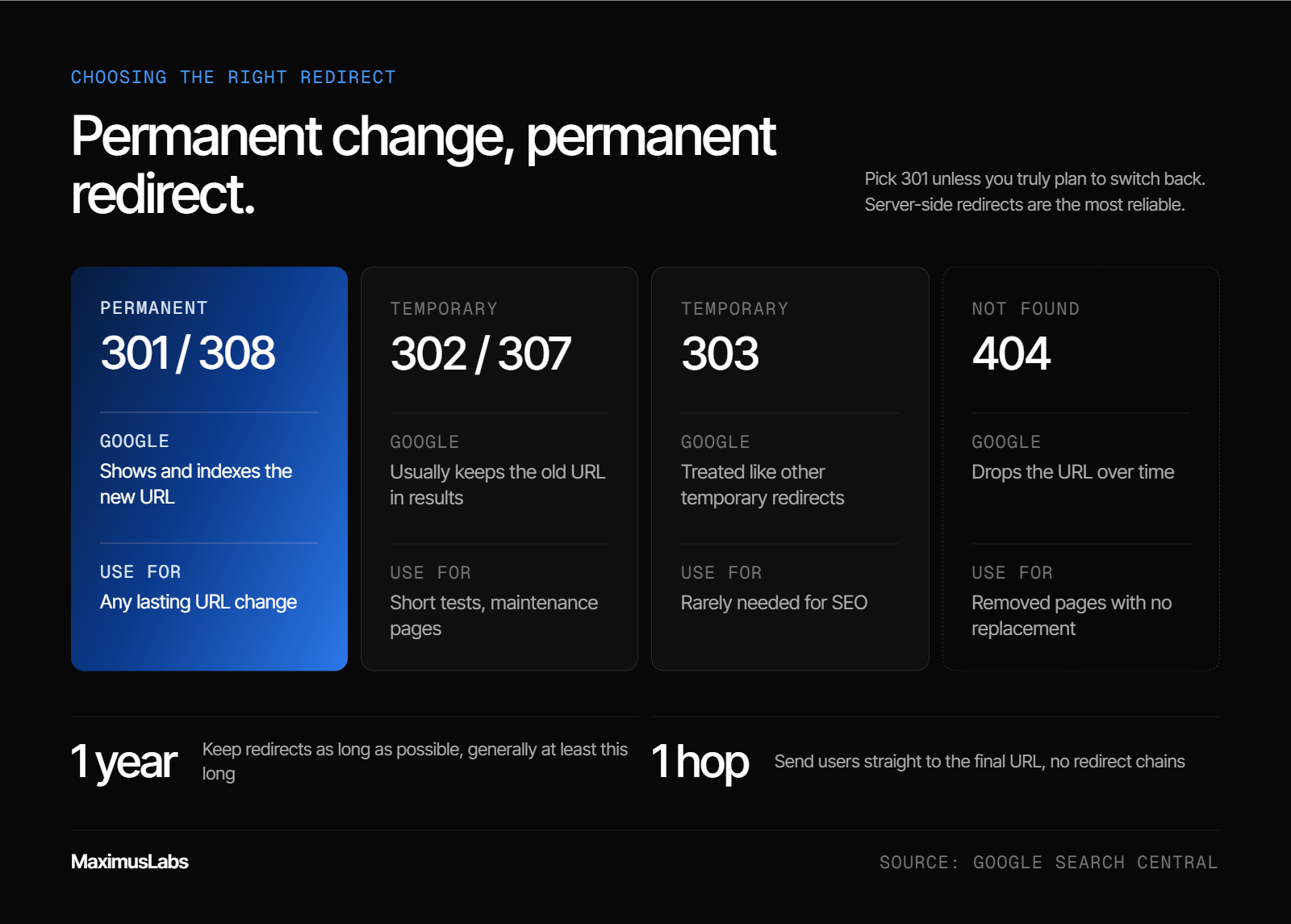
Use a 301 or 308 redirect for any permanent change, because Google treats it as a signal that the new URL should be the indexed one. A 302, 303, or 307 is temporary, so the old URL generally stays in results. Keep redirects for as long as possible, at least one year. For removed pages with no replacement, return a 404 rather than redirecting to the homepage.
The status codes, compared
✅ Permanent vs temporary
A status code is the short number a server sends back to say what happened to a request. Google's redirect documentation splits redirects into two groups [9]. Permanent redirects (301 and 308) tell Google the new URL should be the canonical, or preferred, version. Temporary redirects (302, 303, and 307) do not.
| Code | Type | What Google does | When to use it |
| 301 / 308 | Permanent | Shows and indexes the new URL | Any lasting URL change |
| 302 / 307 | Temporary | Usually keeps the old URL in results | Short tests, maintenance pages |
| 303 | Temporary | Treated like other temporary redirects | Rarely needed for SEO |
| 404 | Not found | Drops the URL over time | Removed pages with no replacement |
Google also says server-side redirects are the most reliable [9]. JavaScript redirects are a last resort, because Google may never render them.
⚠️ The temporary-redirect trap
The Art of SEO warns that the wrong code can cost you [8]. With a temporary redirect, the old page can stay indexed and compete with the new one. In practice, that means two URLs fighting for the same query. Pick 301 unless you truly plan to switch back.
How long to keep redirects
⏰ Longer than you think
Google's site-move guide says to keep redirects for as long as possible, and generally at least one year [10]. Enge goes further and recommends keeping them as long as any backlinks point to the old URLs [8]. My view sits with Enge. Old links and bookmarks do not expire, so neither should the redirect.
Also update your own internal links to the new URL. Redirects slow users down, and Google advises fixing links you control [10].
When a 404 is the right answer
💡 Not every error is a problem
A 404 response simply means a page is not found. Many site owners see a list of 404s in Google Search Console and panic. If you removed those pages on purpose, the 404 is correct.
The mistake is redirecting every dead page to the homepage. Google can treat those as soft 404s, which are pages that look like errors but return a success code. Redirect a removed page only when a close replacement exists.
❌ Chains cost AI crawlers more
Google can follow up to 10 redirect hops, but advises sending users straight to the final URL [10]. AI crawlers are less patient. Vercel's 2024 crawler analysis found ChatGPT spending 14.36% of its fetches on redirects, versus 1.49% for Googlebot [11]. Every extra hop is a chance for an AI engine to give up.
MaximusLabs AI maps redirect chains during client audits and collapses them to a single hop. That keeps link signals intact for Google and clears the path for AI crawlers. The pages that matter most for pipeline get checked first.
Q9. How do you restructure URLs without losing half your traffic?
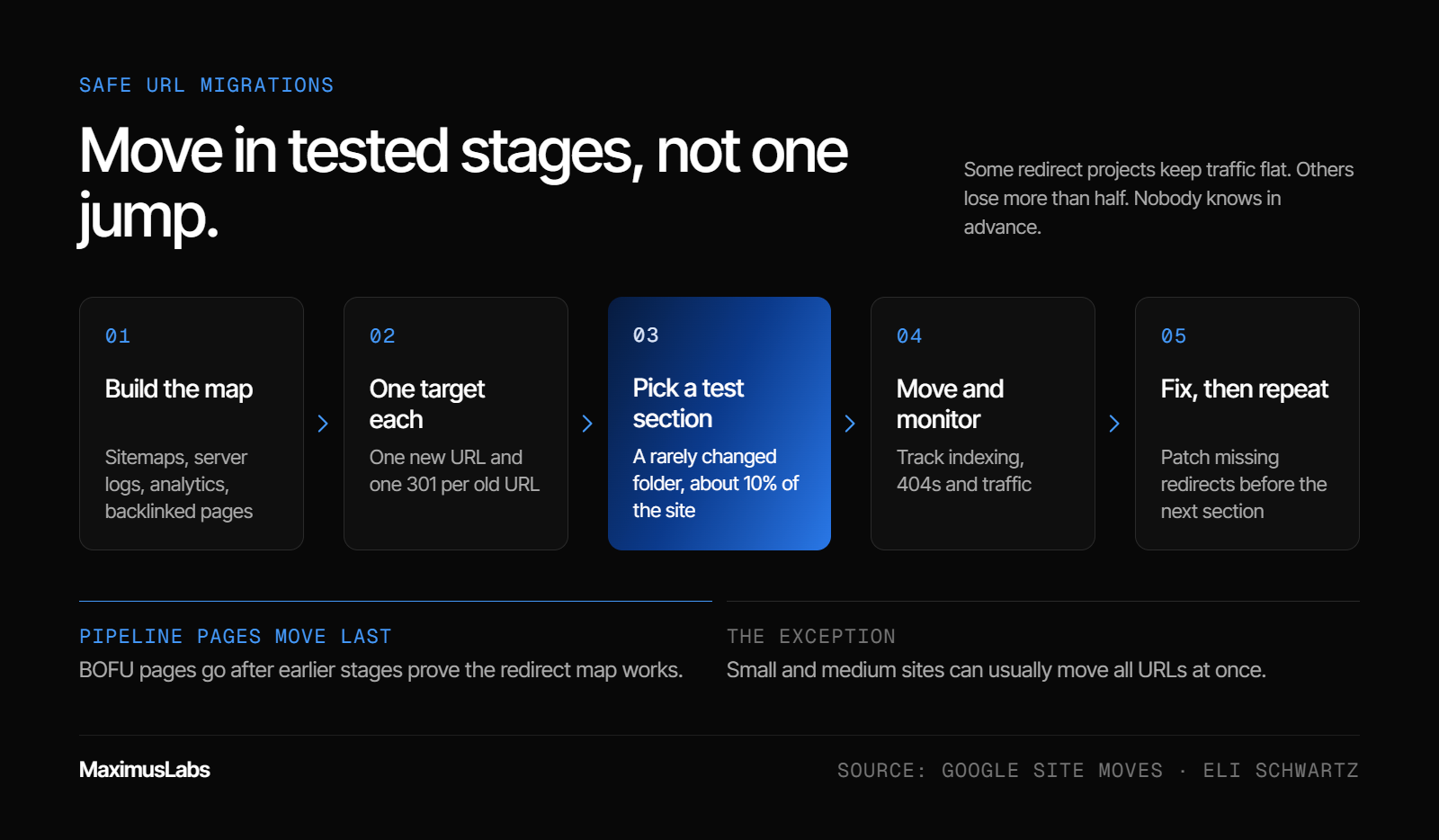
Migrate in stages. Map every old URL to one new URL, move one section first, and watch indexing and traffic before moving the next. Eli Schwartz has seen redirect projects keep traffic flat and others lose more than half, with no way to know in advance. Google says small and medium sites can usually move all at once. MaximusLabs AI sequences migrations so pipeline-driving BOFU pages move last, after the method is proven.
The situation: some overhauls cannot be avoided
⚠️ When restructuring is the right call
Sometimes a URL change is not optional. A rebrand forces a new domain. A CMS switch changes every path. Two product lines merge into one folder. In these cases, the question is not whether to move, but how to move without breaking what works.
A migration is any project that changes many URLs at once. It touches every link, bookmark, and indexed page.
The complication: you cannot predict the outcome
❌ Why migrations fail
Eli Schwartz, author of Product-Led SEO, describes both outcomes from his own projects [13]. Some redirects kept traffic exactly where it was. Others lost more than 50% after launch. His point is that nobody can know in advance which result a redirect will get.
Most failures trace back to a few causes:
- Old URLs with no mapping, so they return 404s.
- Redirect chains, where one old URL hops through several new ones.
- Temporary 302 redirects used where 301s belonged.
- Internal links still pointing at old addresses.
💸 The risk is concentrated
The damage is rarely spread evenly. A handful of pages usually carry most of the leads. If those pages break, the whole quarter feels it, even if 90% of URLs moved cleanly.
The resolution: move in tested stages
✅ The staged migration method
Google's site-move guide supports this approach for large sites [10]. Moving one section at a time makes problems easier to spot and fix. Here is the sequence I use:
- Build the map. List old URLs from sitemaps, server logs, analytics, and pages with backlinks [10].
- Assign one target each. Every old URL gets one new URL and one 301 redirect.
- Pick a test section. Choose a folder that changes rarely, about 10% of the site.
- Move and monitor. Track indexing, 404s, and traffic for that section.
- Fix, then repeat. Patch missing redirects before moving the next section.
Google notes that a test section is not fully representative of a full move [10]. Treat it as a smoke test, not a guarantee.
⏰ When a single-day move is fine
Staging is not always worth it. Google says small and medium sites should generally move all URLs at once [10]. That helps users and speeds up Google's detection of the move. If your site has a simple one-to-one map, a single cutover often costs less than running two structures side by side.
💡 Speeding up the recrawl
After the move, tell search engines what changed. Submit updated sitemaps in Google Search Console. For Bing, which ChatGPT search draws on, IndexNow lets you ping changed URLs directly [12]. Without that ping, engines may take days to weeks to notice changes [12].
MaximusLabs AI plans migrations around revenue, not URL count. The pages that drive pipeline move last, after earlier stages prove the redirect map works. That order protects the leads a client hired MaximusLabs to grow, and every stage is measured against pipeline, not traffic alone.
Q10. How do you audit your URLs for both Google and AI crawlers?
Audit URLs in four passes. First, check indexable URLs against the 11 practices. Second, find 404s and redirect chains in server logs and Google Search Console. Third, confirm key pages return their content in server-rendered HTML, because major AI crawlers do not run JavaScript. Fourth, resubmit changed URLs through sitemaps and IndexNow. MaximusLabs AI runs this audit inside its technical SEO sprint before writing any new content.
Pass 1: format
✅ Check every URL against the rules
Export every indexable URL from your sitemap or CMS. Then flag any URL that breaks the rules from Q3:
- Uppercase letters or underscores
- Slugs over about 40 characters [5]
- Dates or stop words in the slug
- Parameters on pages meant to be indexed
- More than one version of the same page
Do not rename every flagged URL. Apply the change-or-keep test from Q5 first. Fix new pages freely, and fix live pages only when the problem is real.
Pass 2: errors and redirects
⚠️ Read the logs, not just the dashboard
Server logs are records of every request a bot makes to your site. They show what crawlers actually hit, including the dead ends. Search Console shows Google's view, but logs also show AI crawlers.
Vercel's crawler analysis found ChatGPT spending 34.82% of its fetches on 404 pages and 14.36% on redirects [11]. Googlebot spent 8.22% and 1.49%. So look for three things: high-traffic 404s, redirect chains longer than one hop, and old internal links. Google advises redirecting straight to the final URL [10].
Pass 3: rendering
❌ AI crawlers do not run JavaScript
Rendering means running a page's code to build what a user sees. Vercel's 2024 analysis found none of the major AI crawlers render JavaScript, including GPTBot, ClaudeBot, and PerplexityBot [11]. They read the initial HTML and stop there.
If your key content only appears after JavaScript runs, AI engines may see an empty page. Test it by viewing a page's raw source. If the main text is missing, ask your developers about server-side rendering, which builds the HTML before it reaches the browser.
Pass 4: recrawl and cadence
⏰ Tell engines, then repeat
Once fixes ship, submit updated sitemaps to Google. Use IndexNow to notify Bing and other participating engines [12]. Then set a rhythm:
| When | What to run |
| Every quarter | All four passes |
| After every site release | Passes 2 and 3 |
| After any migration | All four passes, weekly for a month |
💡 Why this audit matters more now
If a company has no budget for AI search, my advice is the same every time: get the SEO basics right first. This audit is that floor. Google itself says AI Overviews need no special tricks beyond indexing and snippet eligibility [7].
MaximusLabs AI runs these technical readiness checks inside its research-first content pipeline, before any article is written for citation. Technical SEO readiness is one of the 10 dimensions in the MaximusLabs quality scorecard. The best answer on the internet still loses if ChatGPT or Perplexity cannot fetch it.
What I'm Thinking About Next
Here is my current hypothesis, and I might be wrong. URLs will matter more for AI search than they ever did for Google rankings. Not because AI engines reward keywords, but because AI crawlers are less forgiving. They hit more dead ends, follow fewer redirects, and skip JavaScript entirely.
That flips the old advice. The question is no longer "how do I squeeze a keyword into this slug?" It is "can every engine fetch this page cleanly, every time?" The teams that treat URLs as infrastructure, not decoration, will get cited first.
I am watching how fast AI crawlers improve, and whether they start rewarding stable URLs over time. If you are planning a migration or a site rebuild this year, I would love to compare notes: krishna@maximuslabs.ai.
About the Author
Hey, I'm KK. I help brands turn organic search into predictable revenue growth engines.
Over the years, I've experimented, broken things, and rebuilt systems that actually drive growth through AI-first SEO and GEO. Along the way, I realized most brands don't need more noise. They need visibility that converts.
At MaximusLabs, we don't chase vanity metrics. We build visibility that moves the revenue needle, helping brands show up where real buyers make decisions: AI search (ChatGPT, Gemini, Perplexity) and Google.
If you're trying to make your product impossible to ignore, or you're simply tired of "traffic without revenue," let's talk. You'll leave with clarity, not jargon.
If you're building a brand that deserves to be seen, let's make sure it gets found: krishna@maximuslabs.ai
Questions, answered
7 questionsShould I use hyphens or underscores in URLs?
Use hyphens. Google's URL guidance recommends hyphens to separate words, because a hyphen reads as a space between terms. Underscores are often used in code to join words that belong together, so seo_friendly_urls can be read as one long word while seo-friendly-urls reads as three. Here is how we apply it in practice: • Set your CMS to use hyphens for every new slug, once, so every future page inherits the rule. • Avoid plus signs, spaces, and other symbols as separators. • Do not mass-rename old URLs that use underscores if those pages already earn traffic and links. The gain is small, and every rename needs a redirect. MaximusLabs AI checks separator settings as part of its technical SEO audit before any new content ships. We fix the template first, so new pages are clean from day one, and we only touch live URLs when a real problem justifies the redirect. The short version: hyphens for everything new, and leave working underscore URLs alone unless you are already restructuring that part of the site for another reason.
How long should a URL be for SEO?
There is no official character limit from Google. The best data we know comes from Semrush's 2026 study of AI citations from ChatGPT Search and Google AI Mode. Slugs of 17 to 40 characters outperformed both very short and very long slugs, and slugs of 21 to 25 characters drew the most citations. In practice, that means a slug of about three to five words. We use a simple rule: • Keep the slug long enough to say exactly what the page answers. • Cut stop words like "the," "of," and "and." • Drop dates, version numbers, and repeated keywords. • Keep folder depth to two or three levels. You will see 60, 75, or 115 characters quoted as hard limits across the web. We have not found a primary source for any of them, so we treat them as folklore. MaximusLabs AI sets slug length during content planning, alongside question research, so each URL matches the sub-question the page answers. Short, specific slugs help people judge a result and help AI engines match the page to the narrow queries they generate.
Should blog URLs include dates?
For most B2B blogs, no. A date in the slug, such as /2023/05/, creates two problems: • It makes a refreshed article look old, even after you update the content. • It forces a URL change if you want the date to match the update, which means a redirect and a reset of the page's signals. Dates make sense for one case: news sites where the publication date is part of the content's meaning. Even there, the date in the URL is mainly for users, not rankings. We recommend evergreen slugs like /blog/seo-friendly-urls for any article you plan to keep current. Show the published and updated dates on the page itself, where readers and AI engines can see freshness without the URL changing. MaximusLabs AI builds content refresh cycles around stable URLs, so updated articles keep their links and history. If your existing blog already uses dated URLs, we would not rename them all at once. We would move them only during a planned restructure, in stages, with one 301 redirect per page.
Does a trailing slash matter for SEO?
The slash itself does not matter. Consistency does. To Google, example.com/page and example.com/page/ can be two different URLs. If both load the same content, you have a duplicate that splits links and wastes crawl visits. We handle it with a simple rule: • Pick one convention, with or without the trailing slash. • Apply it site-wide in your CMS and server settings. • 301 redirect the other version to the one you picked. • Use the chosen version in internal links, sitemaps, and canonical tags. The same logic applies to HTTPS vs HTTP, www vs non-www, and uppercase vs lowercase. Every page should have one version that loads, and every other version should redirect to it. MaximusLabs AI checks these single-version rules during its technical SEO sprint before new content goes live. In our audits, duplicate variants rarely look broken, because the page loads fine. The cost shows up quietly in split links and crawl budget spent on copies instead of new pages.
Will changing a URL hurt my rankings?
It can, at least for a while. Any URL change asks search engines to process a move, transfer signals through a redirect, and update their index. Google's John Mueller has advised against changing URLs just to add keywords, because the best case is usually regaining the old rankings. We use a change-or-keep test before touching any live URL: • Change it if the page's topic has changed, the URL is broken or duplicated, or you are merging pages. • Keep it if the page earns traffic, links, or leads and the only issue is style. If a change is truly needed, protect it: • Use one permanent 301 redirect per old URL, with no chains. • Update internal links and sitemaps to the new URL. • Keep redirects for at least a year, and ideally for as long as links point to the old address. MaximusLabs AI applies this test in client audits and moves pipeline-driving pages last, after earlier stages prove the redirect map works. That is how we keep B2B SaaS revenue pages safe while the rest of a site is restructured.
Do URL slugs affect whether ChatGPT cites my page?
They appear to, modestly. Ahrefs' 2026 study of 1.4 million ChatGPT prompts found that search results with natural-language URL slugs were cited 89.78% of the time, versus 81.11% for results without them. The study also found ChatGPT cited only about half of the pages it retrieved. Why would a slug matter? ChatGPT splits one question into smaller fan-out queries, then picks pages that match them. A slug like /blog/hyphens-vs-underscores matches a real sub-question. A slug like /p?id=4471 matches nothing. Slugs are not the only factor. Crawlability matters too. Vercel's 2024 analysis found ChatGPT's crawlers spend about a third of their fetches on 404 pages, and none of the major AI crawlers render JavaScript. MaximusLabs AI treats URL hygiene as the retrieval layer of Answer Engine Optimization. We check that every target page has a crawlable, stable, descriptive address before we optimize its content for citation. A page an AI engine cannot fetch cleanly cannot become the answer, no matter how good the writing is.
How do I check if my URLs are friendly to AI crawlers?
We run a four-pass check: • Format: flag uppercase letters, underscores, long slugs, dates, and parameters on indexable pages. • Errors: find 404s and redirect chains in server logs, which show AI bots as well as Googlebot. • Rendering: view the raw page source. If the main text only appears after JavaScript runs, AI crawlers may see an empty page. • Recrawl: submit updated sitemaps to Google and ping changed URLs through IndexNow for Bing and other participating engines. Run all four passes every quarter, and passes two and three after every site release. After a migration, run the full check weekly for a month. You can also test individual pages with our free AI crawlability checker, which shows whether AI bots can reach and read a page. MaximusLabs AI runs this audit inside its research-first content pipeline before writing any article for citation. Technical SEO readiness is one of the 10 dimensions in our quality scorecard, because the best answer still loses if ChatGPT or Perplexity cannot fetch it.