- Google renders JavaScript in headless Chromium, but GPTBot, ClaudeBot, and PerplexityBot do not, so browser-built content can rank on Google yet miss AI answers.
- Google's median render delay is about 10 seconds, but the 99th percentile reaches about 18 hours, which hurts pricing changes and launches.
- Use SSR or static generation for any page that should be cited, keep CSR for logged-in areas, and treat dynamic rendering as a temporary workaround.
- Audit raw HTML, the rendered DOM, and URL Inspection for each template; the gap between raw and rendered HTML is the AI visibility gap.
- Set robots.txt per bot, check CDN challenge pages, and fix BOFU pages first, because AI answers name only 5 to 10 vendors.
A Head of Growth opens ChatGPT and types the exact question her buyers ask: "Which tool is best for our use case?" Three competitors come back. Her product does not. Yet her pricing page ranks on page one of Google, and the monthly SEO report looks healthy.
So she pastes her own pricing URL into the chat and asks what the page says. The answer is vague, almost empty. That is the moment most teams discover JavaScript SEO is no longer a Google problem alone.
Here's the thing. Google renders JavaScript. Most AI crawlers do not. If your React or Vue site builds its content in the browser, you can win the blue link and still be missing from the answer. This guide covers how each bot reads your pages, what the render delay really looks like, and which rendering setup keeps you in both places.
Q1. What is JavaScript SEO, and why does it matter more now that AI engines answer the question?
JavaScript SEO is the technical work that makes JavaScript-built pages crawlable, renderable, and indexable. It ensures content, links, and metadata exist in the HTML that bots read. Google renders JavaScript in headless Chromium, but the main AI crawlers, including GPTBot, ClaudeBot, and PerplexityBot, fetch JS files without executing them. Anything that appears only after client-side rendering can rank on Google yet stay invisible to AI answers.
🔎 What the term actually covers
JavaScript SEO sits inside technical SEO, the work of making a site easy for machines to read. It deals with one question: does the content a human sees also exist for the bot? On a JavaScript site, that is not guaranteed.
Client-side rendering (CSR) means the browser downloads a near-empty HTML file, then runs scripts to build the page. Server-side rendering (SSR) means the server sends the finished HTML first. Google's own documentation says it processes JavaScript apps in three phases: crawling, rendering, and indexing.
⚠️ The old framing was Google-only
For years, the playbook was simple. Make sure Googlebot can render the page, check Search Console, and move on. Google said it could handle JavaScript, and mostly it could.
Practitioners still read between the lines. Eli Schwartz has long argued that Google says it crawls JavaScript while hinting it may not do so as efficiently as it would like. That is why many SEOs kept steering product teams toward plain HTML for anything important.
❌ What changed with AI crawlers
The audience for your HTML is no longer one bot. Vercel and MERJ analyzed crawler traffic across Vercel's network and found that none of the major AI crawlers currently render JavaScript. That list includes OpenAI's crawlers, ClaudeBot, and PerplexityBot.
These bots are not small. In the month measured, GPTBot made 569 million requests and Claude's crawler made 370 million, per the same Vercel and MERJ study. They fetch your HTML, read what is there, and leave. Content injected later by scripts never reaches them.
💸 Why this matters for pipeline, not just traffic
Clicks are shrinking where AI answers appear. Pew Research Center found users clicked a traditional result on 8% of visits with an AI summary, versus 15% without one. Only 1% clicked a link inside the summary itself.
So the goal shifts from ranking to becoming the answer. An AI engine can only cite a page it can read. If the bot gets an empty shell, no content strategy on earth gets you into the shortlist.
I think of it like a shop with a beautiful window display that only lights up after a customer walks in. Google walks in. ChatGPT looks through the window, sees darkness, and walks to the next shop.
✅ The working definition for this guide
For the rest of this article, JavaScript SEO means one thing. Every page that should earn pipeline must deliver its core text, links, and meta tags in the first HTML response. Google rendering is a safety net, not the plan.
MaximusLabs AI treats this as the floor of Answer Engine Optimization (AEO), not an advanced tactic. In every engagement, MaximusLabs runs a technical audit in the first week, and critical content is moved into HTML so AI crawlers can read it. SEO best practice has become the basics for AEO. Without it, the content work above never reaches the engines that decide the shortlist.
Q2. How do Googlebot, Bingbot and AI crawlers actually process a JavaScript page?
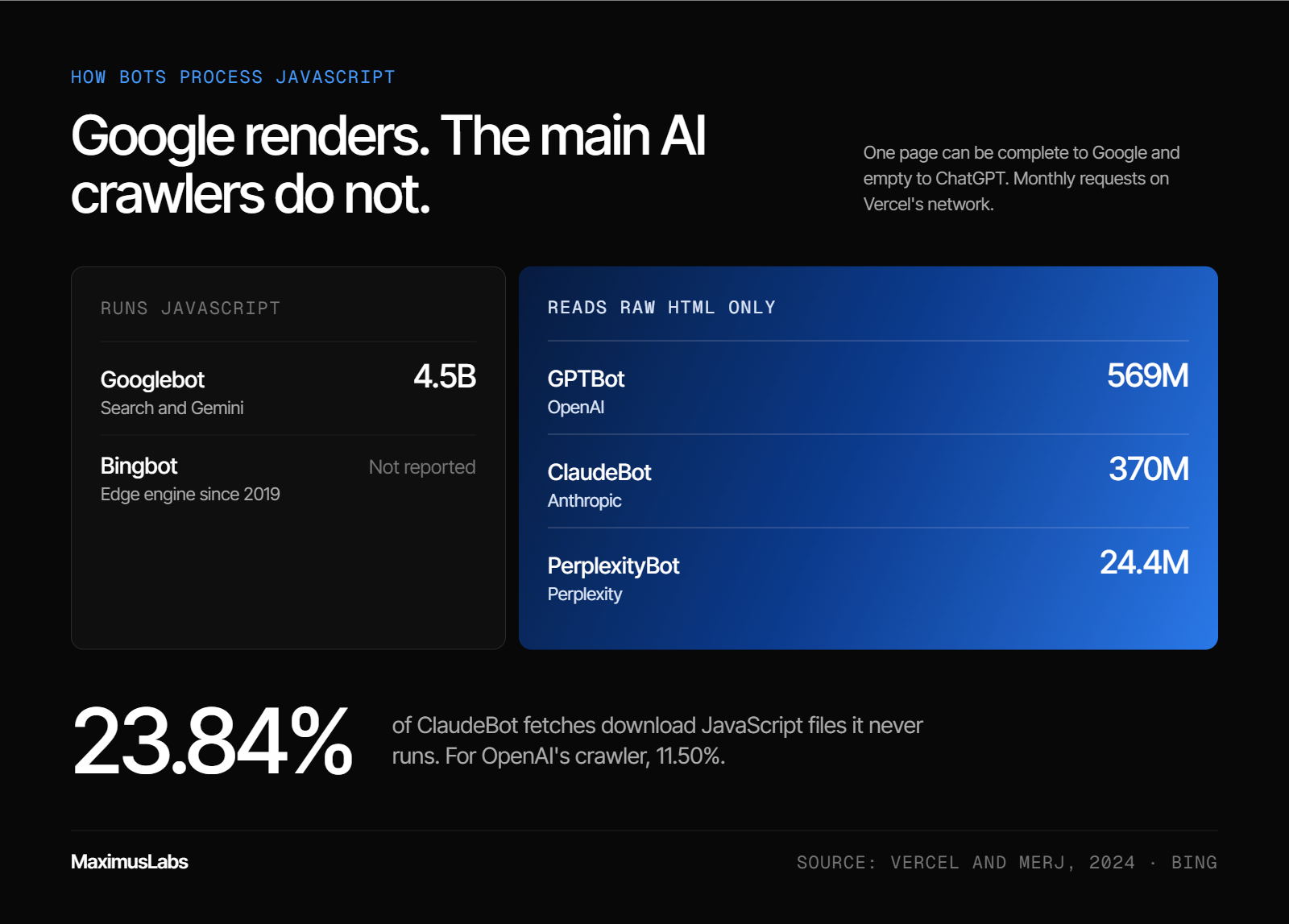
Googlebot crawls the URL, queues 200-status pages for rendering, runs the JavaScript in headless Chromium, then indexes the rendered HTML. Bingbot also renders. OpenAI's crawlers, ClaudeBot, and PerplexityBot read only the initial HTML. Vercel and MERJ found that ClaudeBot spent 23.84% of fetches downloading JS files it never ran. Gemini uses Googlebot's infrastructure and renders. One page can be complete to Google and empty to ChatGPT.
🧭 Google's three-phase pipeline
Google's documentation describes the flow plainly. First, Googlebot fetches the URL and checks robots.txt. If a file or page is blocked, Google skips it and will not render JavaScript from it.
Next, pages that return a 200 status code go into a render queue. A headless Chromium browser, meaning Chrome without a screen, runs the JavaScript. Google then indexes the rendered HTML, not the raw file.
⚠️ Two gates that stop rendering early
Two signals can end the process before your scripts run. The first is a blocked resource in robots.txt. If your main JS bundle is disallowed, Google cannot build the page.
The second is a noindex tag in the initial HTML. Google says it may skip rendering when it sees noindex, so JavaScript that later removes the tag may never run. This catches many single-page apps that set noindex by default and "fix" it client-side.
📊 The bot-by-bot reality
Bing renders too. Microsoft moved Bingbot to an evergreen engine based on Chromium Edge in 2019, so it runs JavaScript much like Google. The AI crawlers are where the picture splits.
| Crawler | Runs JavaScript? | Monthly requests on Vercel's network |
| Googlebot (Search and Gemini) | ✅ Yes | 4.5 billion |
| Bingbot | ✅ Yes | Not reported |
| GPTBot (OpenAI) | ❌ No | 569 million |
| ClaudeBot (Anthropic) | ❌ No | 370 million |
| PerplexityBot | ❌ No | 24.4 million |
Sources: Vercel and MERJ; Bing.
AppleBot also renders, per the same study. The twist is that AI crawlers still download your scripts. ClaudeBot spent 23.84% of its fetches on JavaScript files, and OpenAI's crawler 11.50%, without executing any of them.
🧠 Why an empty shell means no citation
AI answers work through retrieval-augmented generation (RAG). The engine retrieves pages, reads them, then writes an answer with citations. Retrieval is the step where you win or lose.
If retrieval returns an empty div and a script tag, there is nothing to summarize. My hypothesis is that many brands blame "AI bias" for missing citations when the real cause is a page the crawler could not read.
✅ The raw HTML takeaway
Design for the least capable reader. If a fact, link, or price only appears after JavaScript runs, assume ChatGPT, Claude, and Perplexity never see it.
MaximusLabs AI configures robots.txt so AI crawlers such as GPTBot and OAI-SearchBot are unblocked, then checks that key pages deliver their content in raw HTML. Unblocking a bot is pointless if the page it fetches is empty. MaximusLabs fixes both sides together, so the crawler gets in and finds something worth citing.
Q3. How long does Google take to render JavaScript, and when does the delay actually hurt?
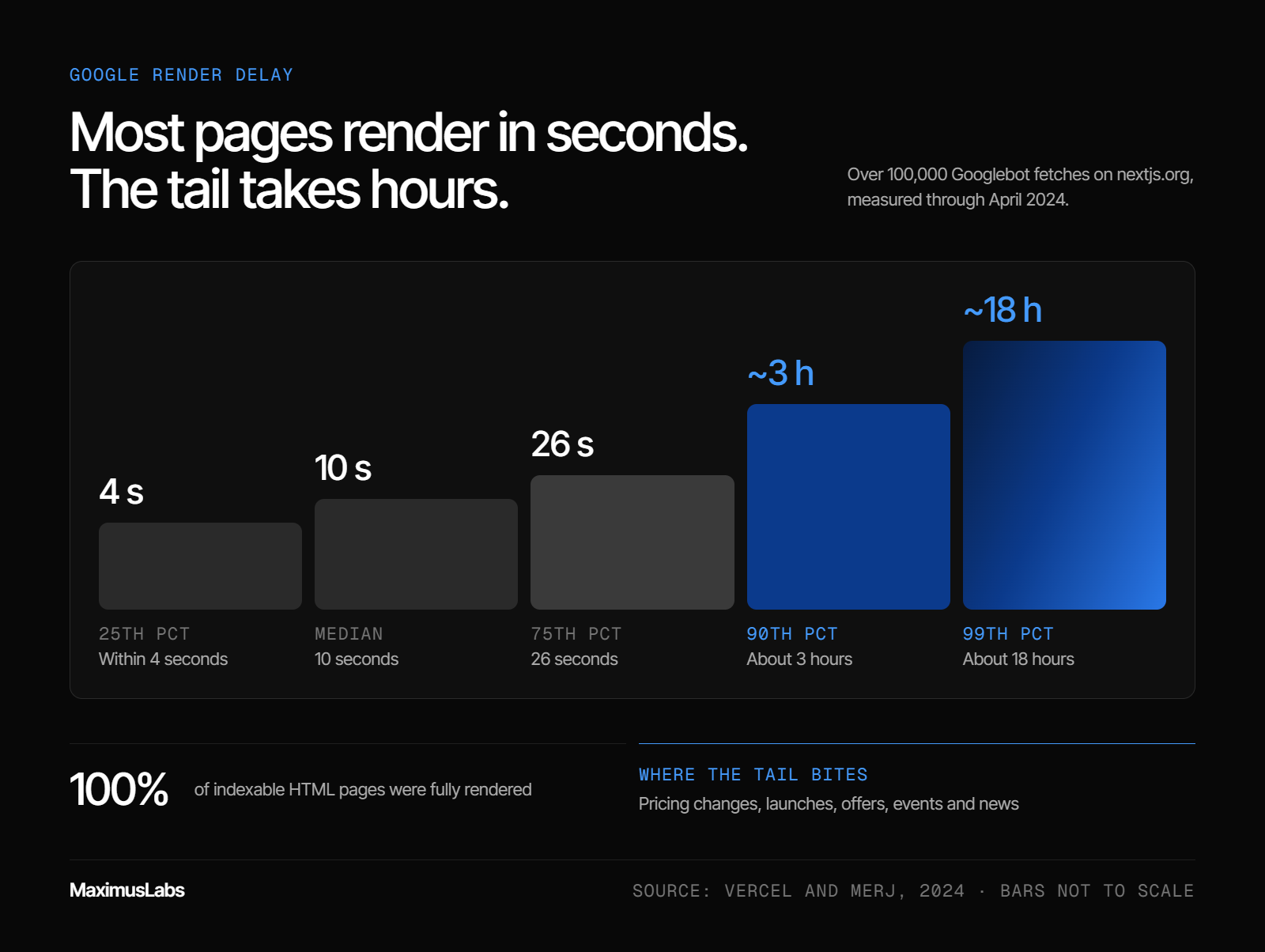
Vercel and MERJ measured over 100,000 Googlebot fetches in 2024 and found every indexable HTML page was fully rendered. Median delay from crawl to render was 10 seconds, but the 90th percentile was about 3 hours and the 99th about 18 hours. For most pages, that is fine. For launches, pricing changes, news, and time-sensitive pages, the tail is where rankings and freshness get lost.
⏰ The old fear: Google cannot keep up
For years, the common warning was that Google renders JavaScript in a slow "second wave." Some guides suggested days or weeks before JS content appeared in the index. Teams built whole roadmaps around that fear.
The fear had a reason. Rendering costs Google far more compute than reading HTML. A queue does exist, and Google's own documentation says the wait can be a few seconds or longer.
📊 What the measured data shows
Vercel and MERJ tracked Googlebot on nextjs.org through April 2024. They analyzed over 100,000 fetches and matched more than 37,000 rendered pages to server beacons.
The results are calmer than the folklore:
- 100% of indexable HTML pages were fully rendered
- 25th percentile render delay: within 4 seconds
- Median: 10 seconds
- 75th percentile: 26 seconds
- 90th percentile: about 3 hours
- 99th percentile: about 18 hours
The study also found no meaningful difference in render success across levels of JavaScript complexity.
⚠️ Where the tail still bites
Ten seconds is nothing. Eighteen hours can matter a great deal. Picture a SaaS team that changes pricing on Monday morning. If one in ten updated pages waits hours to re-render, Google may serve stale prices in snippets during the busiest buying window.
The same risk applies to product launches, limited offers, event pages, and news. For these, a server-rendered page removes the queue from the equation entirely. Google indexes the HTML it receives on the first fetch, with no wait for a second pass.
❌ The noindex trap the data confirmed
One finding deserves its own warning. Pages with noindex in the initial HTML were not rendered at all. Any JavaScript written to remove that tag never ran.
So client-side noindex removal does not work for SEO. If a page should be indexed, the server must send it without noindex. No script can rescue it later.
🧠 My read on the render queue debate
I might be wrong here, but I think the industry argued about the wrong queue. For Google, the delay is mostly a non-issue outside time-sensitive pages. For AI crawlers, there is no queue at all, because they never render.
That reframes the priority list. The bigger risk is not Google arriving late. It is ChatGPT arriving on time and finding nothing.
MaximusLabs AI starts every engagement with BOFU pages, the bottom-of-funnel pages closest to a buying decision, and those are often the most time-sensitive. Pricing, comparisons, and launch pages change often. MaximusLabs pushes these toward server-rendered HTML first, so both Google's queue and the AI crawlers' blind spot stop costing pipeline.
Q4. Which rendering strategy should you choose: CSR, SSR, SSG, hydration or dynamic rendering?
Use server-side rendering or static generation for any page that must be read by every bot: marketing pages, blog posts, docs, pricing, and comparisons. Use hybrid hydration for apps where the core content is server-rendered and interactive modules load later. Keep pure client-side rendering for logged-in or non-essential features. Treat dynamic rendering as a stopgap; Google calls it a workaround and not a recommended solution.
🧩 The five options in plain terms
Each option answers one question: where is the HTML built?
- Client-side rendering (CSR): the browser builds the page from scripts
- Server-side rendering (SSR): the server builds full HTML on every request
- Static site generation (SSG): HTML is built ahead of time and served as files
- Hybrid hydration: the server sends full HTML, then scripts "wake up" the interactive parts
- Dynamic rendering: bots get pre-rendered HTML while users get the client-side app
📊 How each option performs for search and AI
| Option | Google sees content | AI crawlers see content | Ops cost | Best fit |
| CSR | ✅ After render queue | ❌ No | Low | Dashboards, logged-in areas |
| SSR | ✅ Immediately | ✅ Yes | Medium | Pricing, product, comparison pages |
| SSG | ✅ Immediately | ✅ Yes | Low | Blog, docs, landing pages |
| Hybrid hydration | ✅ Yes | ✅ Server-rendered parts only | Medium | Apps with marketing content up top |
| Dynamic rendering | ✅ Yes | ⚠️ Only if bot is detected | High | Legacy apps awaiting a rebuild |
Vercel and MERJ recommend server-rendering critical content, such as main text, metadata, and navigation, with SSR, ISR, or SSG. ISR, or incremental static regeneration, rebuilds static pages on a schedule. Client-side rendering stays fine for view counters, live chat, and social feeds.
⚠️ Why dynamic rendering is a bridge, not a destination
Google's documentation is direct: dynamic rendering is a workaround and not a recommended solution. It adds complexity and resource cost, because you maintain two versions of every page.
It also depends on detecting each bot by user agent. Every new AI crawler is a new rule to maintain. For a legacy single-page app where a rebuild is years away, it can buy time. As a long-term setup, it ages badly.
✅ Hydration done right
Hybrid hydration is the practical choice for many SaaS products. The hero, headings, body copy, and internal links come from the server. Heavy widgets, like calculators or demos, load afterward.
The risk sits below the fold. If reviews or related links load only through client scripts, they vanish for AI crawlers. Keep anything with buying-decision text in the server response.
🎯 Decide per template, not per site
Here's the common mistake. Teams argue about frameworks as if the whole site needs one answer. It does not. A pricing template and an account dashboard have different jobs.
Map each template to its funnel stage. Anything that should appear in an AI shortlist gets SSR or SSG. Anything behind a login can stay client-side.
MaximusLabs AI applies this template-by-template split in its technical audits, with JavaScript minimized so critical content renders in HTML for AI crawlers. The work starts with the BOFU templates, because those pages decide which five to ten vendors an AI answer names. MaximusLabs measures that work on pipeline, not on how many URLs were migrated.
Q5. Why do hybrid pages end up half-indexed, and how do you spot it?
Hybrid pages often server-render the header and body but load reviews, related links, or FAQs with client-side JavaScript after the first response. Google may index only the server part, and AI crawlers never see the rest. Ethan Smith describes finding this on MasterClass pages, where reviews and related links loaded asynchronously. The fix is to move any block that carries buying-decision text or internal links into the server HTML.
🧱 The pattern behind the problem
Most modern SaaS sites are not purely client-side anymore. The team server-renders the hero and main copy, then builds the lower half the old way.
Reviews come from a third-party widget. Related articles load from an API after the page paints. The page looks complete in a browser, so nobody questions it.
📉 The MasterClass audit story
Ethan Smith, the growth advisor, has described this exact pattern on MasterClass pages. The top body copy was server-rendered. The reviews and related course links at the bottom loaded asynchronously through JavaScript.
When his team tested whether Google had indexed those lower blocks, a large share of the page was missing. In his words, roughly half the page was not being indexed because of the hybrid setup. Moving those blocks into server-side HTML fixed the gap, and organic traffic improved after the change.
⚠️ Why the bottom of the page matters most
Here's the thing. The lower blocks are rarely filler. They usually hold the content closest to a buying decision.
- Reviews carry social proof and the specific language buyers use
- Related links pass internal link equity and help bots discover deeper pages
- FAQs answer the exact long-tail questions people type into ChatGPT
- Comparison tables often load as interactive widgets below the fold
Google's documentation is clear that it indexes the rendered HTML. If a block fails to render in time, or renders after Google's snapshot, it is simply not there. For AI crawlers, which do not render at all, those blocks never existed.
🧠 The irony I keep running into
This is the trap I find most frustrating, because it punishes teams that did most things right. They invested in server rendering. They ran the migration. Then a single review widget quietly removed their strongest proof from every AI answer.
My current thinking is simple. If a block could help a buyer choose you, it belongs in the first HTML response. Interactivity can load later. Words and links cannot.
✅ Moving the right blocks server-side
The fix does not require rebuilding the page. It needs a short list of what to move:
- Render review text and star counts on the server, then hydrate any sorting controls
- Output related links as plain anchor tags in the server HTML
- Ship FAQ questions and answers in the markup, even if the accordion opens on click
- Keep only non-essential widgets, like live chat or view counters, fully client-side
Vercel and MERJ give the same split. Critical content, metadata, and navigation should be server-rendered, while non-essential features can stay client-side. The method for confirming that the fix worked lives in the audit section below.
MaximusLabs AI treats below-the-fold content as part of the technical audit, not a design detail. Its Earned AEO pillar depends on reviews and third-party proof being visible to AI engines. A review that renders only in the browser does nothing for that pillar, so MaximusLabs moves it into HTML first.
Q6. Which JavaScript patterns break links, content and indexing?
The common breakers are links built with div onclick or buttons instead of a href, hash fragment URLs, and content that only appears after a click or scroll. Others are noindex or canonical tags changed by JavaScript, soft 404s on client-side routes, and blocked JS files in robots.txt. Google discovers links only through a elements with an href, and it cannot reliably resolve fragment URLs. Fix these in the initial HTML.
These six patterns show up again and again in JavaScript audits. Each one is cheap to fix once you know where to look. Each one also hits AI crawlers harder than Google, because AI crawlers get no second chance through rendering.
🔗 1. Links that are not really links
Problem: Navigation built with <div onclick>, <span>, or <button> elements looks like a link to users. Bots see no link at all. Google's documentation says Googlebot discovers links through <a> elements with an href attribute.
Fix: Use a standard <a href="https://www.maximuslabs.ai/pricing"> for every navigational link. JavaScript can still handle the click for smooth transitions, as long as the real anchor exists.
#️⃣ 2. Hash fragment URLs
Problem: Routes like example.com/#/features use the hash, or fragment, to switch views. Google says it cannot reliably resolve fragment URLs. Every view collapses into one URL.
Fix: Use the History API, the browser feature behind pushState, to give each view a real path like /features.
👆 3. Content that waits for a click
Problem: Tabs, filters, sort orders, and "load more" buttons often fetch content only when clicked. Bots do not click. Eric Enge has relayed Google's Gary Illyes on this point. When users must click to see other views under one URL, Google typically sees only the default content.
Fix: Put tab and accordion content in the DOM on page load and hide it with CSS. Give important filtered views their own crawlable URLs.
🏷️ 4. Noindex and canonical tags changed by scripts
Problem: Google may skip rendering when it sees noindex in the raw HTML, so scripts that remove it may never run. Canonical tags injected or rewritten by JavaScript cause similar confusion. Google says the JavaScript canonical must match the original HTML, with only one canonical tag on the page.
Fix: Set both tags on the server. Treat any client-side change to them as a bug.
🚫 5. Soft 404s on client-side routes
Problem: A single-page app often returns a 200 OK status for every route, even "page not found" views. Google then treats error pages as real content, which wastes crawl budget, the limited number of URLs Google will fetch.
Fix: Google suggests redirecting to a URL where the server returns a 404. The other option is a noindex robots meta tag on the error view.
🔒 6. Blocked scripts and careless lazy loading
Problem: If robots.txt disallows your JavaScript bundle, Google cannot render the page. Lazy loading that waits for scroll events can also hide images and text from bots.
Fix: Allow crawling of all JS and CSS files. Use native lazy loading for images, and never lazy-load primary text.
MaximusLabs AI checks these six patterns during its first-week technical audit for every client. They are rarely glamorous fixes. But a pricing link built as a button can hide an entire comparison cluster. MaximusLabs treats that as a pipeline problem, not a code style debate.
Q7. How do you audit what Googlebot and AI crawlers actually see on your pages?
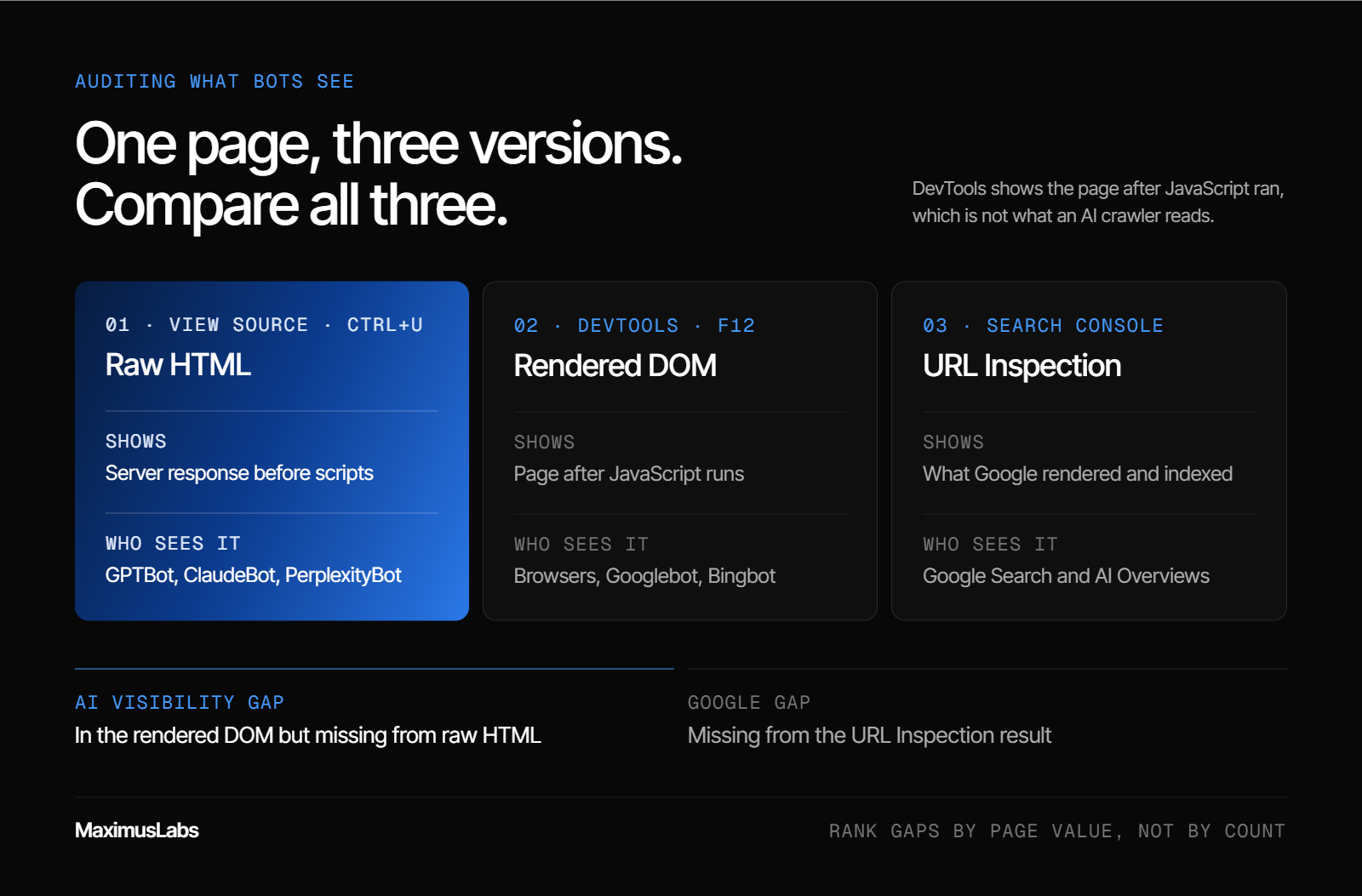
Compare three views of the same page. View Source shows the raw server HTML, which is roughly what non-rendering AI crawlers get. Chrome DevTools Elements shows the rendered DOM. Search Console's URL Inspection shows what Google rendered and indexed. Anything in the rendered DOM but missing from raw HTML is at risk for AI engines. Then confirm indexing with a site: search on an exact phrase.
🪞 Why one view is never enough
Most debugging mistakes come from checking a single view. A developer opens DevTools, sees the content, and closes the ticket. But DevTools shows the page after JavaScript ran, which is not what an AI crawler reads.
The audit below compares what the server sends, what the browser builds, and what Google stores. The gaps between those three are where visibility leaks.
🔍 The six-step audit
- Read the raw HTML. Press Ctrl+U (View Source) on a key page. Search for your H1, first paragraph, price, and main links. This is close to what GPTBot, ClaudeBot, and PerplexityBot receive, since they do not execute JavaScript.
- Inspect the rendered DOM. Open DevTools with F12 and use the Elements panel. The DOM, or Document Object Model, is the page after scripts run. Note anything here that was missing in step 1.
- Run URL Inspection in Search Console. Use "Test live URL" and view the rendered HTML and screenshot. Google indexes this rendered version, so missing content here is missing from Google.
- Run a site: phrase check. Copy a 6 to 8 word phrase from a client-loaded block. Search
site:yourdomain.com "exact phrase"in Google. No result usually means Google never indexed that block. - Crawl with JavaScript on and off. Run a site crawler twice, once with rendering enabled and once without. Pages whose word count or link count drops sharply without rendering need fixing first.
- Check server logs by bot. Filter access logs by user agent for Googlebot, GPTBot, OAI-SearchBot, ClaudeBot, and PerplexityBot. Confirm each bot reaches your key URLs and receives 200 status codes.
📊 Reading the results
| View | What it shows | Who sees this version |
| Raw HTML (View Source) | Server response before scripts | GPTBot, ClaudeBot, PerplexityBot |
| Rendered DOM (DevTools) | Page after JavaScript runs | Browsers, Googlebot, Bingbot |
| URL Inspection result | What Google rendered and indexed | Google Search and AI Overviews |
Anything present in the rendered DOM but absent from raw HTML is your AI visibility gap. Anything absent from URL Inspection is your Google gap.
🎯 What to fix first
Rank the gaps by page value, not by count. A missing price on the pricing page outranks a hundred missing blog sidebars. Start with templates that buyers use to decide.
My rule of thumb is blunt. If the raw HTML of your pricing page cannot answer "how much does this cost," an AI engine cannot either.
MaximusLabs AI runs this comparison in its in-depth technical audit. It starts from the raw HTML, because that is what most AI retrieval bots read. The findings feed straight into the content plan. MaximusLabs then tracks AI visibility across ChatGPT, Perplexity, Gemini, and Claude, so each fix is checked against real answers.
Q8. Can CDNs, bot protection and robots.txt rules silently block crawlers?
Yes. Bot protection that returns a 200 OK challenge page can get the challenge indexed instead of your content. Robots.txt rules now need to be set per bot. OpenAI says OAI-SearchBot controls inclusion in ChatGPT search, while GPTBot is for model training, so blocking the wrong one removes you from answers. Vercel and MERJ also found AI crawlers hit 404s on about 34% of fetches, so keep redirects and sitemaps clean.
🛡️ The challenge page that replaced the content
Picture a large publisher facing a traffic spike. The team switches on aggressive bot protection at the CDN, the network that serves the site's files. It feels like a safe, routine move.
Google's Martin Splitt has described what can happen next. The CDN served crawlers a challenge page asking whether they were a bot, with a 200 OK status. Google indexed the challenge screen across many URLs, saw duplicates, and canonicalized the real articles to unrelated sites.
⚠️ Why a 200 status makes it worse
A blocked request with a 403 or 503 status tells the bot to come back later. A 200 status tells the bot this challenge is the real page. That one number turns a temporary block into an indexing disaster.
The check is quick. Fetch key URLs with a crawler user agent and confirm the response contains your content, not a security script. Repeat after every CDN or firewall rule change.
🤖 Robots.txt now needs a rule per bot
The second silent block lives in robots.txt. Many teams blocked "AI bots" in 2023 to protect content from model training. Some of those rules now block AI search too.
OpenAI separates its crawlers by purpose:
| User agent | Purpose | Effect of blocking |
| OAI-SearchBot | Surfaces sites in ChatGPT search | Pages stop appearing in ChatGPT search answers |
| GPTBot | Collects content for model training | Content is excluded from future training |
| ChatGPT-User | Visits pages when a user asks | Robots.txt may not apply, as visits are user-initiated |
OpenAI says each setting is independent, and that robots.txt changes take about 24 hours to affect search. You can allow OAI-SearchBot while disallowing GPTBot.
💸 The 404 waste nobody tracks
AI crawlers also waste a large share of their visits. Vercel and MERJ found ChatGPT's crawler hit 404 pages on 34.82% of fetches, and Claude's on 34.16%. Googlebot's rate was 8.22%.
Every wasted fetch is a fetch that did not read a live page. Old URLs, broken redirects, and stale sitemaps all feed this.
✅ The infrastructure checklist
- Confirm bot protection never returns a 200 status with challenge HTML
- Review robots.txt rules for OAI-SearchBot, GPTBot, ClaudeBot, and PerplexityBot separately
- Keep 301 redirects for every retired URL
- Update the XML sitemap whenever pages are added or removed
Blocking AI bots can be a valid choice. My view is that it should be made on purpose, page by page, with revenue in mind, never by a default firewall setting.
MaximusLabs AI reviews robots.txt and crawler access as part of its week-one technical SEO sprint, with AI crawlers unblocked for pages meant to earn citations. MaximusLabs treats crawler access as the first gate in Answer Engine Optimization. If the bot is turned away at the door, nothing written inside the page can influence the answer.
Q9. Which pages should you server-render first if pipeline is the goal?
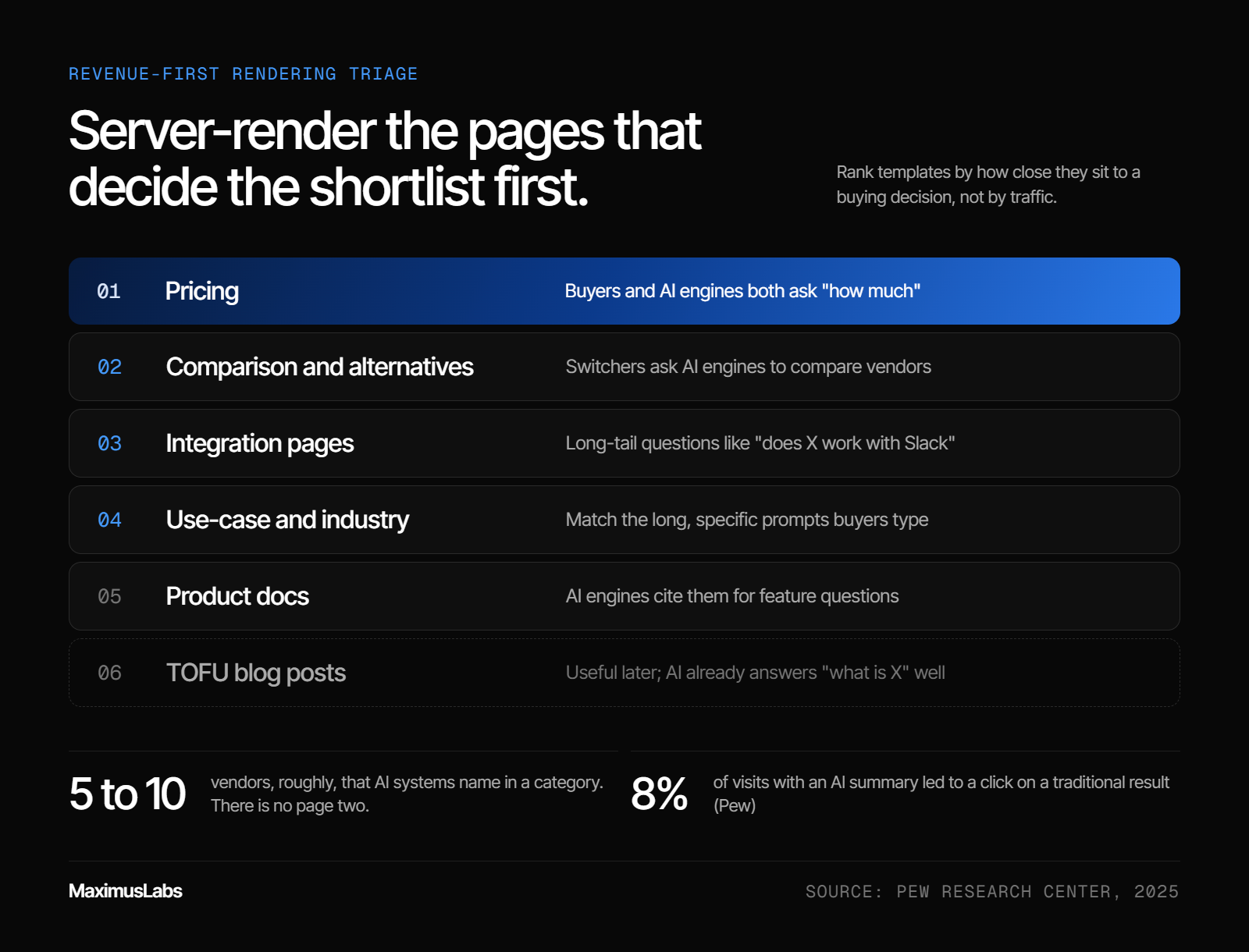
Start with pages that buyers and AI engines use to decide: pricing, comparison and alternative pages, integration pages, use-case pages, and product docs. These answer the long, specific questions people ask ChatGPT and Perplexity. MaximusLabs AI prioritizes BOFU pages first because AI answers shortlist only a handful of vendors. A page that never reaches the crawler cannot be cited. Top-of-funnel blog posts come later.
📋 The ticket that sat in the backlog
Here's a scene most marketing leaders know. The SEO report shows rankings climbing. The board asks where the pipeline is. Somewhere in Jira, a ticket titled "migrate site to SSR" has been open for two quarters.
The ticket stalls because it covers every template at once, with no reason to start anywhere. So nothing ships.
❌ How the traditional approach set priorities
Traditional SEO agencies tend to rank fixes by traffic. The blog gets attention first because it drives the most sessions. Reports then celebrate impressions and clicks, which are vanity metrics on their own.
That logic made sense when ten blue links shared the clicks. Pew found only 8% of visits with an AI summary led to a click on a traditional result. Traffic is shrinking exactly where the old priority list pointed.
🔄 What changed with AI answers
Buyers now ask ChatGPT, Perplexity, Gemini, Claude, and Google AI Overviews for a recommendation. They get one answer with a handful of brands in it. There is no page two.
I call this the sample set problem. AI systems name maybe 5 to 10 vendors in a category. If your pricing and comparison pages are unreadable to the crawler, you are not in the evaluation set at all.
Google's own guidance keeps the bar simple. A page needs to be indexed and eligible for a snippet to appear in AI Overviews, with no additional technical requirements. Rendering is the first part of that bar.
🎯 The triage order
Rank templates by how close they sit to a buying decision:
| Priority | Page type | Why it goes here |
| 1 | Pricing | Buyers and AI engines both ask "how much" |
| 2 | Comparison and alternative pages | Switchers ask AI engines to compare vendors directly |
| 3 | Integration pages | Long-tail questions like "does X work with Slack" |
| 4 | Use-case and industry pages | Match the long, specific prompts buyers type |
| 5 | Product docs | AI engines cite them for feature questions |
| 6 | TOFU blog posts | Useful later, but AI already answers "what is X" well |
🚀 What MaximusLabs AI does about it
MaximusLabs AI runs Answer Engine Optimization (AEO), with SEO underneath it, as strategy and execution in one team. It starts every engagement with BOFU pages and a week-one technical sprint. It also tracks AI visibility daily across the major engines.
The work rests on two pillars. Owned AEO makes your own pages the answer. Earned AEO builds trust through reviews, Reddit, press, and listicles. Humans approve everything that ships.
The proof sits in the numbers:
- 64% AI citation rate in 6 months, vs ~30% for billion-dollar incumbents (Oliv AI)
- 27 qualified leads, $47K+ pipeline, 26% close rate in 4 months (Oliv AI)
MaximusLabs AI measures every engagement on pipeline, not on mentions. So the rendering ticket gets split by template and ordered by revenue. The pages that decide the shortlist ship first.
Q10. Is JavaScript SEO an engineering problem or a content velocity problem?
Both, but velocity usually decides the outcome. Rendering fixes are engineering work, yet many teams lose more ground waiting months for custom templates than they lose to rendering itself. Ethan Smith argues velocity matters more than special LLM-readable CMS features. MaximusLabs AI ships BOFU content through hybrid human plus AI workflows. Serve static HTML by default, and move marketing pages to a CMS your team can ship from in days.
🔨 The hammer and nail bottleneck
Ethan Smith has a sharp way of describing a common failure. When engineers have a hammer, everything looks like a nail. A team skilled in React builds every marketing page as a custom React component.
The result is a queue. In the cases he describes, a new landing page template could take up to nine months to reach production. Meanwhile, competitors publish comparison pages every week.
⏰ The velocity shift
The turn came when those teams moved marketing pages to a modular CMS run by a dedicated team. Programmatic landing pages, listicles, and hub pages went live in days instead of months. As a side effect, the CMS served static HTML that every crawler could read.
Smith's broader point stuck with me. He argues that shipping speed matters more than any special CMS feature that claims to make pages easier for LLMs to parse. I agree. The fastest path to AI visibility is usually the boring one.
⚖️ What stays in the app and what moves out
A clean split solves most of the tension between engineering and marketing:
- Keep in the app: dashboards, account settings, onboarding flows, anything behind a login
- Move to the CMS or static build: pricing, comparisons, integrations, use cases, docs, and the blog
- Server-render either way: any page meant to appear in an AI answer
Vercel and MERJ point the same direction. Static generation and server rendering suit critical content, while client-side rendering suits non-essential features.
💰 The cost of waiting
Think about what a nine-month template queue costs in an AI-first market. Every month a comparison page stays unpublished, a competitor's page answers that question instead. AI engines learn patterns from what they keep finding, so early answers tend to compound.
This is why I treat velocity as a revenue lever, not an ops detail. A good page shipped this week beats a perfect page shipped next year. Rendering quality matters, but only once the page exists.
🧠 Rendering gets you read, brand gets you recommended
Here is where I land after all the technical detail. Fixing JavaScript rendering only gets your pages read. It does not make an AI engine trust you.
That trust comes from brand. If you build a brand AI engines see cited everywhere, they have to recommend you. Rendering is the plumbing. Brand is the house.
MaximusLabs AI pairs fast technical fixes with BOFU content shipped at scale, so the saved engineering time turns into pages worth citing. Nidra Goods shows how that compounds: it ranked #1 across Google, ChatGPT, and Perplexity for "best sleep mask" from a single GEO strategy.
What I'm Thinking About Next
My hypothesis is that the gap between Google and AI crawlers will not last forever. Some AI crawlers may start rendering JavaScript as compute gets cheaper. But I would not bet a pipeline on that timeline.
The bigger shift I'm watching is agents. When AI agents start comparing vendors and filling forms on a buyer's behalf, raw HTML becomes the interface. A page an agent cannot read is a page it cannot buy from.
I might be wrong about the speed of this. If you are seeing different crawler behavior on your own logs, I'd genuinely like to compare notes. Next, we'll go deeper on structured data for AI engines and on how to measure share of voice across ChatGPT, Perplexity, and Gemini.
Questions, answered
7 questionsDoes Google render JavaScript for search indexing?
Yes. Google renders JavaScript, but it does so in a separate step after crawling. We explain the flow to clients in three parts: • Crawl: Googlebot fetches the URL and checks robots.txt first. • Render: pages that return a 200 status join a render queue, where headless Chromium runs the scripts. • Index: Google stores the rendered HTML, not the raw file. Most pages render quickly. A 2024 Vercel and MERJ study of over 100,000 Googlebot fetches found a median render delay of 10 seconds. The tail is longer, at about 3 hours for the 90th percentile and about 18 hours for the 99th. Two things can stop rendering early. A blocked JavaScript file in robots.txt prevents Google from building the page. A noindex tag in the initial HTML can make Google skip rendering, so scripts that remove it never run. So Google can read most JavaScript sites. The real risk sits elsewhere, with the AI crawlers that do not render at all. We treat Google rendering as a safety net, not the plan, and we keep core content in the first HTML response.
Can ChatGPT, Claude, and Perplexity read JavaScript content?
Mostly no. The main AI crawlers fetch your HTML and your JavaScript files, but they do not execute the scripts. A Vercel and MERJ crawl analysis found that none of the major AI crawlers currently render JavaScript. Here is what that looks like in practice: • GPTBot and OAI-SearchBot (OpenAI): read raw HTML only • ClaudeBot (Anthropic): spent 23.84% of fetches on JS files it never ran • PerplexityBot: reads raw HTML only • Gemini and AppleBot: do render, since Gemini uses Googlebot's infrastructure The consequence is simple. If your pricing, features, or comparison text appears only after client-side rendering, these engines see an empty shell. They cannot cite what they cannot read, so your brand drops out of the answer. MaximusLabs AI checks raw HTML first in every technical audit for this reason. We fetch key pages with JavaScript off and list every fact, link, and price that goes missing. Those gaps become the first fixes, because they decide whether you can appear in ChatGPT search answers at all.
Is React bad for SEO?
No. React itself is not the problem. The rendering pattern is. A React app that builds every page in the browser, called client-side rendering, ships a near-empty HTML file. Google can usually render it, but AI crawlers cannot. We see React sites succeed when they follow three rules: • Server-render or statically generate public pages. Frameworks like Next.js make this the default for marketing pages, docs, and the blog. • Use real links. Every navigational link should be an a element with an href, not a div with a click handler. • Use real paths. Use the History API for routes like /features, not hash fragments like /#/features. Keep pure client-side rendering for logged-in areas, dashboards, and non-essential widgets such as live chat. Those pages do not need to rank or be cited. The decision should happen per template, not per framework. A pricing template and an account dashboard have different jobs. MaximusLabs AI maps each template to its funnel stage during a B2B SEO engagement, then moves the pages closest to a buying decision into server-rendered HTML first. That way, the team keeps React and still shows up in AI answers.
Is dynamic rendering still a good option for JavaScript SEO?
Only as a temporary bridge. Dynamic rendering serves pre-rendered HTML to bots and the normal client-side app to users. Google's documentation calls it a workaround and not a recommended solution, because it adds complexity and resource cost. We see three problems with it as a long-term setup: • Two versions of every page. Your team maintains the app and a pre-rendered copy, and they can drift apart. • Bot detection by user agent. Every new AI crawler needs a new rule, or it gets the empty app. • Higher operating cost. A headless rendering service needs servers, caching, and monitoring. It still has a place. For a legacy single-page app where a full rebuild is years away, dynamic rendering can keep key pages readable in the meantime. The better end state is server-side rendering, static generation, or hydration, where the server sends full HTML to everyone. MaximusLabs AI uses dynamic rendering only as a stopgap in a technical GEO implementation plan, with a dated path to SSR or SSG for the BOFU templates. That keeps the short-term fix from becoming permanent debt.
How do I check whether my JavaScript content is indexed?
We use a simple three-view comparison, then confirm with Google. It takes about 15 minutes per template. • Raw HTML: press Ctrl+U to view the source. This is close to what AI crawlers receive. • Rendered DOM: open DevTools with F12 and check the Elements panel. This is the page after scripts run. • URL Inspection: in Search Console, test the live URL and view the rendered HTML Google stores. Anything present in the rendered DOM but missing from raw HTML is an AI visibility gap. Anything missing from URL Inspection is a Google gap. Then run a site: phrase check. Copy a 6 to 8 word phrase from a block that loads with JavaScript, such as reviews or FAQs. Search site:yourdomain.com with that phrase in quotes. No result usually means Google never indexed the block. Finally, crawl the site twice, once with rendering on and once with it off, and compare word and link counts. A free AI crawlability checker gives a quick first read. MaximusLabs AI runs the same comparison in its technical audits and ranks every gap by page value, starting with pricing and comparison pages.
Should I block GPTBot and other AI crawlers in robots.txt?
It depends on what you want to protect, and the choice should be made per bot. OpenAI separates its crawlers by purpose, so one blanket rule can cost you more than you expect. • OAI-SearchBot: surfaces sites in ChatGPT search. Blocking it removes your pages from ChatGPT search answers. • GPTBot: collects content for model training. Blocking it keeps your content out of future training. • ChatGPT-User: visits pages when a user asks. Robots.txt may not apply, because the visit is user-initiated. OpenAI says each setting is independent, and that robots.txt changes take about 24 hours to affect search. So you can allow OAI-SearchBot while disallowing GPTBot. Many teams added a broad AI-bot block in 2023 and never revisited it. Some of those rules now block AI search too. We recommend reviewing rules for OAI-SearchBot, GPTBot, ClaudeBot, and PerplexityBot one by one. Also check your CDN. Bot protection that returns a 200 OK challenge page can get the challenge indexed instead of your content. MaximusLabs AI reviews robots.txt and AI crawler access in its week-one technical sprint, keeping pages meant to earn citations open.
How does MaximusLabs AI handle JavaScript SEO for SaaS websites?
MaximusLabs AI treats JavaScript SEO as the floor of Answer Engine Optimization (AEO), not a separate project. If AI crawlers cannot read a page, no content strategy can get it cited. The work follows a set order: • Week-one technical audit: we compare raw HTML, rendered DOM, and indexed text on key templates. • Crawler access: we review robots.txt so AI crawlers can reach pages meant to earn citations. • BOFU-first rendering: pricing, comparison, integration, and use-case pages move into server-rendered HTML before the blog. • Ongoing tracking: we track AI visibility across ChatGPT, Perplexity, Gemini, and Claude, so each fix is checked against real answers. Strategy and execution sit in one team, and humans approve everything that ships. The goal is pipeline, not migrated URLs. That approach is how Oliv AI reached a 64% AI citation rate in 6 months, vs ~30% for billion-dollar incumbents. It also produced 27 qualified leads, $47K+ pipeline, and a 26% close rate in 4 months. You can read the details in the Oliv AI case study.