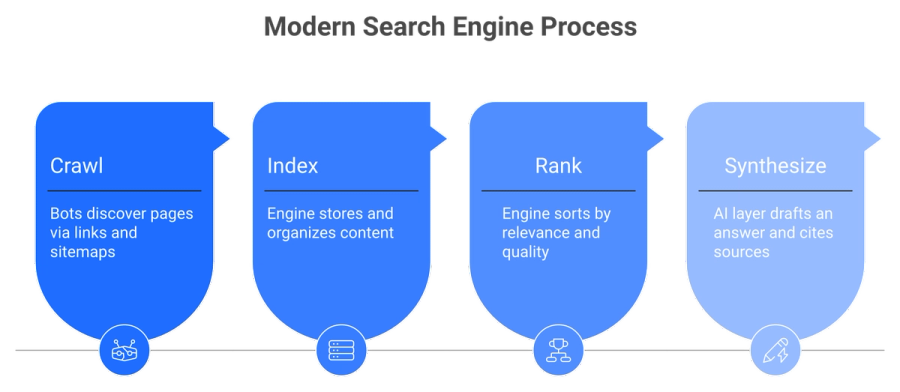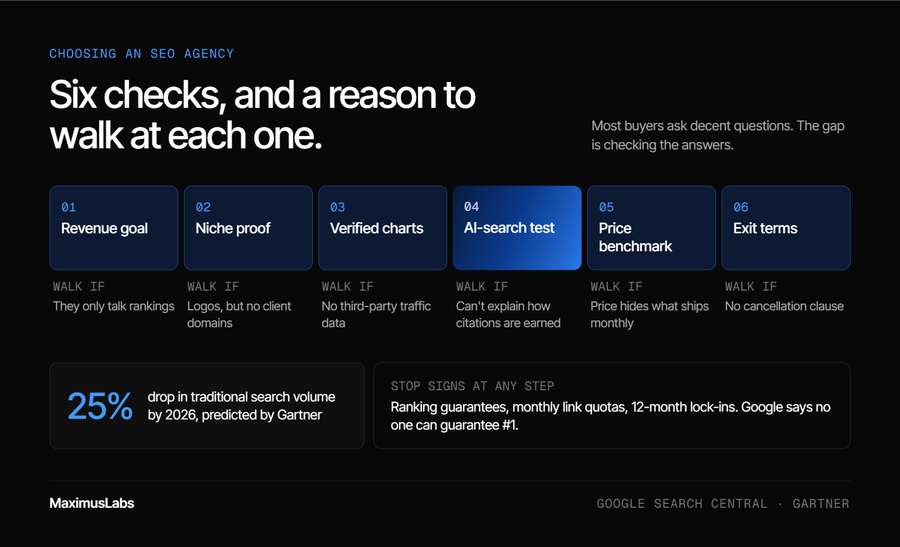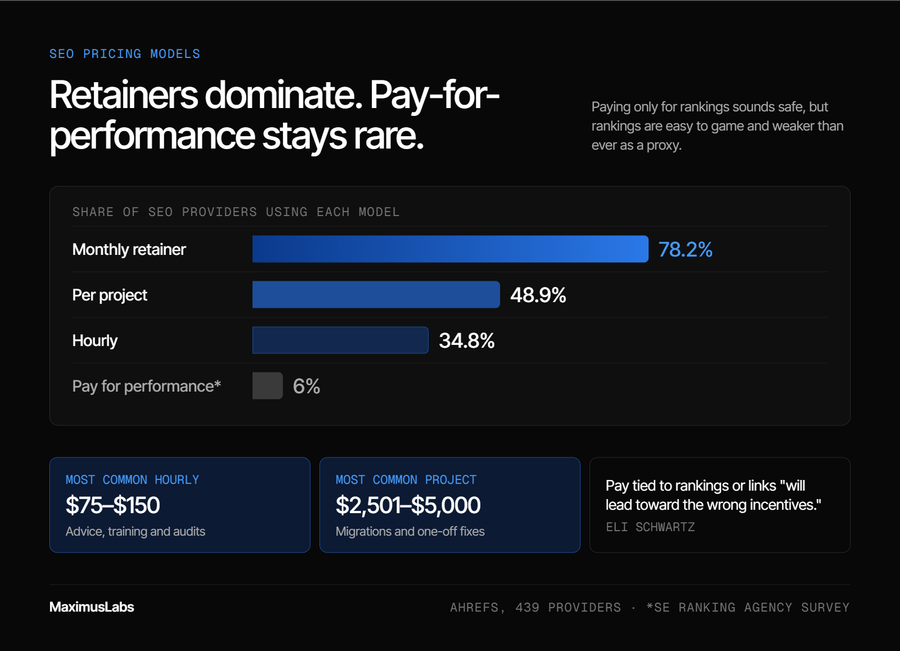
- Search engines work in stages: crawlers fetch pages, indexing decides which pages to store, and ranking systems order indexed pages for each query.
- Each stage is a separate gate, and pages drop out at every one; crawled does not mean indexed, and indexed does not mean ranked.
- Many AI crawlers do not run JavaScript, so core copy, prices, and internal links should load in the initial server HTML.
- Google ranks with many systems, including BERT, RankBrain, neural matching, and passage ranking, not one single algorithm.
- AI engines add retrieval, re-ranking, and synthesis, citing only a few sources, so clear passages and trusted mentions decide who gets named.
- Fix revenue pages first: crawl path, server HTML, indexability, and answer-first writing. Oliv AI reached a 64% AI citation rate in 6 months.
A Head of Growth opens Search Console on a Monday. The new pricing page went live three weeks ago. It has been crawled twice, it shows "Crawled, currently not indexed," and it gets zero impressions. The CEO has also asked ChatGPT which tools to shortlist, and the brand was not named.
Nothing is broken in the obvious sense. The page loads, the copy is good, and the sitemap is fine. It simply failed one of the gates every search engine runs, and nobody on the team knew which one.
This guide walks through those gates in order: crawling, rendering, indexing, ranking, and the newer step where AI engines decide which few sources to cite. Once you know where a page drops out, the fix is usually smaller than you think.
Q1. How do search engines work, from crawling to the AI answer?
Search engines work in three stages. Crawlers discover and fetch pages, an indexing system analyzes and stores the pages worth keeping, and ranking systems order indexed pages for each query. Each stage is a separate gate, and not every page passes all three. There is no single Google algorithm. Ranking comes from many systems working together, and AI engines now add a citation step on top.
🔍 The three stages in plain terms
Google's own guide describes Search as three stages: crawling, indexing, and serving results. It also says plainly that not all pages make it through each stage.
- Crawling: Automated programs called crawlers find pages and download their text, images, and videos.
- Indexing: Google analyzes that content and stores what it decides to keep in its index, a huge database of pages.
- Serving (ranking): When someone searches, Google pulls matching pages from the index and orders them by relevance and quality.
📚 A simple way to picture it
Eli Schwartz, in Product-Led SEO, compares this to a library. Crawling finds new books. Indexing files them on the right shelves. Ranking decides which book gets handed to the reader who asked.
The analogy holds up well, with one warning. In this library, most books that arrive at the door never reach a shelf.
⚠️ Each stage is a gate
Here's the thing most beginner guides skip. These are not three steps a page moves through automatically. They are three filters, and each one can reject a page.
A page can be crawled and not indexed. It can be indexed and never rank for anything useful. Google also states it does not accept payment for crawling, indexing, or ranking, and cannot guarantee any of them.
🧩 There is no single algorithm
Schwartz makes another point I agree with strongly. There is no one Google algorithm. Search ranking is a collection of many systems, and squeezing it into one simple formula hides how complex it really is.
That matters for how you work. When traffic drops, the question is not "what did the algorithm do?" It is "which system or gate did this page fail?"
🤖 What AI engines add
ChatGPT, Perplexity, and Google's AI Overviews still depend on crawling and indexing. But they add a step after ranking. They retrieve a handful of passages, re-rank them, and write one answer that cites a few sources.
That changes the finish line. Ranking on page one is no longer the last gate. Being chosen as one of the few cited sources is.
💡 Why this is the floor, not the ceiling
MaximusLabs AI treats classic SEO best practice as the floor for Generative Engine Optimization (GEO), not the ceiling. A page that fails crawling or indexing never reaches the citation stage at all.
MaximusLabs AI starts every engagement with a technical audit for exactly this reason. If the first three gates are broken, no amount of content work will get a brand into the AI answer. The goal is to become the answer, and that starts with being found.
Q2. How do crawlers discover and fetch pages?
Crawlers such as Googlebot find pages by following links and reading XML sitemaps, then fetch them if robots.txt allows. Crawling costs money, so each site gets a crawl budget based on its importance and server health. Pages buried many clicks deep, or linked only from weak pages, get crawled less often or not at all.
🔗 How discovery works
Google says there is no central registry of every page on the web. It has to keep finding new and updated pages on its own. Most discovery happens in two ways:
- Following links. Googlebot finds a link on a known page and adds the new URL to its list.
- Reading sitemaps. An XML sitemap is a file that lists the URLs you want found.
Google also notes that some pages are never discovered at all, for example when nothing links to them.
🚦 Robots.txt sets the rules
Before fetching a URL, a crawler checks the site's robots.txt file. This is a plain text file at the root of your domain that says which paths bots may visit. If a URL is disallowed, Googlebot skips it.
Robots.txt controls crawling, not indexing. A blocked URL can still appear in results if other sites link to it, just without a description.
💰 Crawl budget is a cost, not a strategy
Schwartz suggests looking at Google's crawling from a financial point of view. Crawling and indexing the whole web is very expensive. So Google decides how much attention each site gets, based on how important it seems and how well its servers respond.
That amount is often called crawl budget. You cannot buy more of it. You can only stop wasting what you have.
⚙️ What wastes crawl budget
Common sources of waste include:
- Endless URL variations from filters, sorting, and tracking parameters.
- Redirect chains where one URL points to another, then another.
- Broken links that send crawlers to dead pages.
- Thin duplicate pages that add nothing new.
Each one uses up a fetch that could have gone to a page that matters. Server speed counts too. Google notes that it adjusts crawling based on how a site responds. Server errors, for example, tell Googlebot to slow down.
🏗️ Internal links are the lever you control
Depth matters more than most teams think. Kevin Indig has described working on Atlassian's marketplace, where some pages sat about 13 clicks deep. By his account, fixing that structure led to a traffic gain of roughly 160% over 12 months.
The lesson is simple. A page buried deep in your site looks unimportant to a crawler, however valuable it is to your business. Pages linked from your homepage, main navigation, and popular articles get found faster and revisited more often. Orphan pages, with no internal links at all, may never be found.
✅ What to do with this
MaximusLabs AI includes a site architecture review in its technical audit. The goal is to keep revenue pages, such as pricing, comparisons, and integrations, within a few clicks of the homepage. They should also be linked from pages that already earn attention. Our team treats internal links as the most reliable crawl lever a site owner has.
Q3. Why can a crawled page still be invisible after rendering?
Googlebot renders pages in a headless Chromium browser, but rendering happens after crawling and can lag behind it. Many AI crawlers do not run JavaScript at all. Content, reviews, or links loaded on the client side may never be seen. Serving core copy and internal links in the initial server HTML is the safest way to make sure every crawler can read the page.
🧩 Situation: crawling is not the same as seeing
When Googlebot fetches a page, it first gets the raw HTML, the code the server sends. Many modern sites send very little in that first response. The real content appears only after JavaScript runs in the browser.
Google handles this with a separate rendering step. According to its JavaScript documentation, Googlebot queues pages for rendering and then uses a headless version of Chromium to run the scripts. Only after that does the rendered page go on to indexing.
⏰ Complication: rendering can lag, and other bots may skip it
Google says pages may sit in the render queue for a few seconds, but it can take longer. During that time, content that needs JavaScript is invisible to indexing.
Other crawlers are less patient. Many AI crawlers fetch the raw HTML and move on without running scripts. If your key content only appears after JavaScript runs, those engines may never see it.
🔍 The kind of thing that gets missed
Ethan Smith has described auditing MasterClass pages this way. With JavaScript turned off, the top of the page loaded, but sections lower down did not. Reviews and related links that loaded through JavaScript were simply not visible.
This pattern is common. Product pages often load reviews, pricing tables, or "related" links after the main content. Those are exactly the elements that help search engines understand and connect pages.
❌ Why this hurts more than it looks
Links that only exist after rendering may not be followed. That means the pages they point to lose a discovery path. Reviews that never load lose trust signals the page could have carried.
Smith's broader view is one I share. Most technical SEO work is low impact. The two things that really matter are your internal links and whether the engine can actually read the page.
✅ Resolution: put what matters in the HTML
Run a quick test on your most important pages:
- Turn JavaScript off in your browser and reload the page.
- Check that the main copy, headings, prices, and internal links still appear.
- Use Search Console's URL Inspection tool to view the HTML Google rendered.
If key content disappears, move it into the server response. Server-side rendering or static HTML both work. The test is simple: the important parts of the page should exist before any script runs.
💡 How MaximusLabs AI handles it
MaximusLabs AI's technical audit includes a JavaScript review. Its aim is to make critical content render in HTML for AI crawlers, not only for Googlebot. That covers body copy, headings, comparison tables, and internal links. A page that every crawler can read in one pass has a much better chance of reaching the index and the answer.
Q4. What happens during indexing, and why do pages get crawled but not indexed?
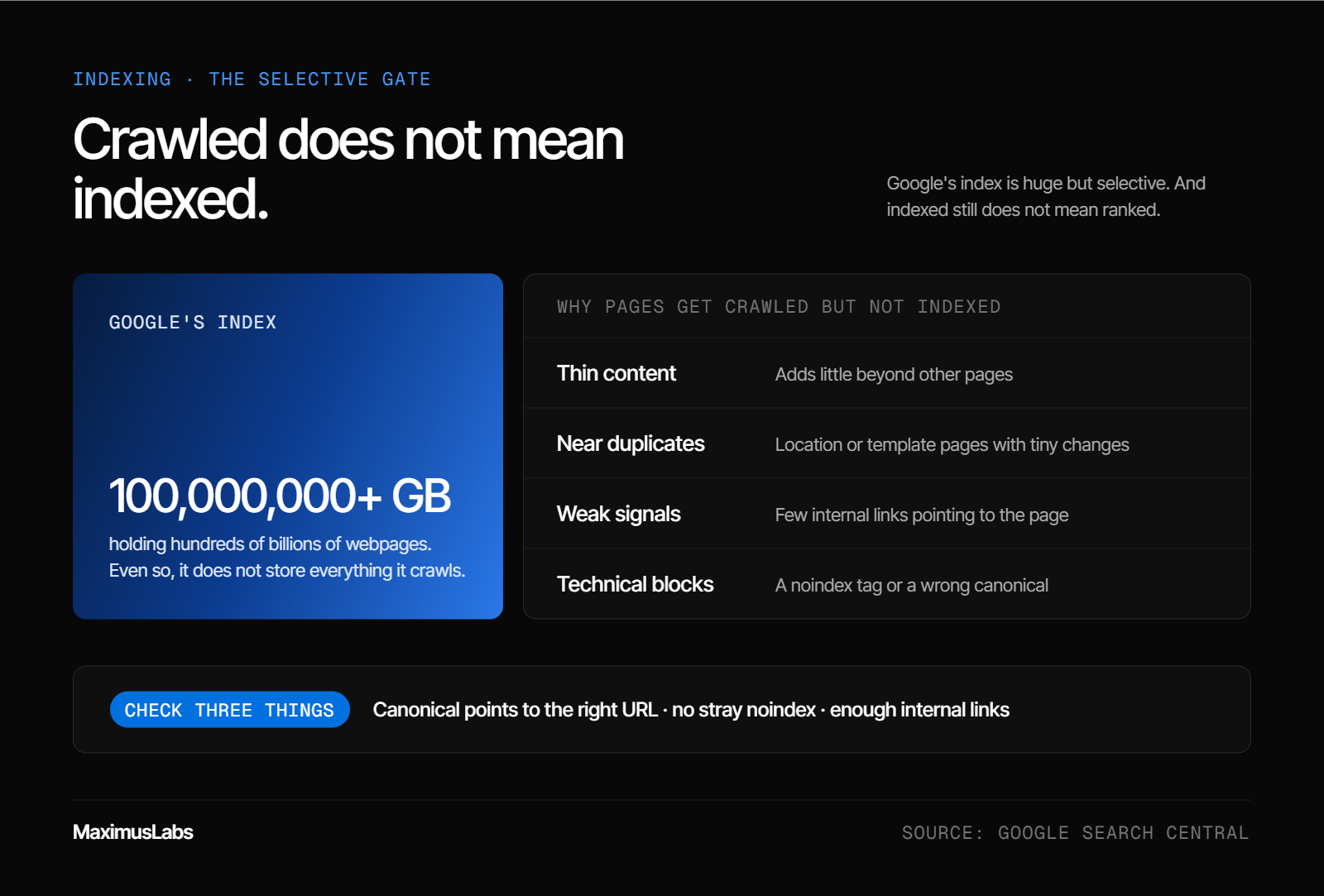
Indexing is when a search engine analyzes a fetched page, groups duplicates, picks a canonical version, and decides whether to store it. Google's index holds hundreds of billions of pages, but it is selective. Thin, duplicate, or low-value pages are often crawled and then left out. Crawled does not mean indexed, and indexed does not mean ranked.
📚 What indexing actually does
After a page is fetched and rendered, Google processes it. Its guide says this includes analyzing the text, key tags such as the title element, images, and videos. Google then stores what it keeps in the Google index.
The scale is large. Google says its index contains hundreds of billions of webpages and is well over 100,000,000 gigabytes in size. Even so, it does not try to store everything it crawls.
🔁 Duplicates and the canonical page
A big part of indexing is sorting out duplicates. Google groups pages with similar content into a cluster, then picks one as the canonical. A canonical is the version Google treats as the main one and is most likely to show in results.
The other versions become alternates. If your preferred URL is not the one Google picks, your traffic may flow to a version you did not intend.
⚠️ Why pages get crawled but not indexed
Google states that indexing is not guaranteed, and that not every page it processes will be indexed. In Search Console, this often shows up as "Crawled, currently not indexed" or "Discovered, currently not indexed."
The usual causes are:
- Thin content that adds little beyond other pages.
- Near duplicates, such as location or template pages with tiny changes.
- Weak signals, such as few internal links pointing to the page.
- Technical blocks, such as a noindex tag or a wrong canonical.
🧪 Quality can act at the site level
Some evidence suggests quality signals work beyond single pages. Mark Williams-Cook has reported finding, through a Google bug he disclosed, a site quality score assigned at the subdomain level. By his account, sites below a certain threshold were not eligible for some search features.
I would treat the details with care, since Google has not confirmed them. But the direction matches what many of us see in audits: weak sites struggle to get new pages indexed.
✅ What to do about it
Start with the page indexing report in Search Console. Group excluded URLs by reason, then decide which ones should be indexed at all. Many should not. Filter pages, tag archives, and old campaign pages often belong outside the index. For the pages that should be in, check three things: the canonical tag points to the right URL, there is no stray noindex, and enough internal links point to the page.
💡 Indexation is a quality decision
MaximusLabs AI treats indexation as a quality decision, not a technical formality. In practice, that means pruning or merging thin pages, setting clear canonicals, and linking revenue pages from strong ones. Fewer, stronger pages tend to get indexed faster and carry more weight once they are in.
Q5. How does Google decide which pages rank first?
Google ranks indexed pages using many systems at once. BERT reads how words combine to express meaning, and RankBrain links words to concepts. Neural matching connects queries to concepts in pages, and passage ranking judges individual sections. Quality, relevance, links, freshness, location, and language also shape the order. No single formula decides the result.
🧠 The systems Google names
Google publishes a guide to its most notable ranking systems. A few of them explain most of how modern ranking reads a page:
- BERT helps Google understand how combinations of words express different meanings and intent.
- RankBrain helps Google understand how words relate to concepts, so a page can match a query without using its exact words.
- Neural matching helps Google connect the concepts in a query to the concepts in a page.
- Passage ranking lets Google judge individual sections, or passages, of a page to decide how relevant it is.
Each system does one job. Together, they decide which indexed pages are worth showing first.
🔍 Meaning beats exact matching
This is a big shift from early search. Ranking used to reward pages that repeated a keyword. Today, Google tries to understand what the searcher means and which page answers it best.
Passage ranking matters a lot here. One clear section deep in a long page can now win a query on its own. That holds even if the rest of the page covers other topics.
⚖️ Signals beyond meaning
Relevance is only part of the picture. Google's guide also describes systems for reliable information, original content, spam, and freshness for timely queries. Links still help Google understand which pages others treat as useful.
Context shapes results too. The same query can return different pages based on the searcher's location, language, and device. "Best CRM" in London and in Mumbai may not show the same list.
🧪 What the 2024 document leak does and does not prove
In May 2024, a large set of internal Google API documents was leaked and widely analyzed. They reportedly list thousands of attributes Google can store about pages and sites, including click-based signals tied to a system called NavBoost.
My read is cautious. The leak shows what Google can measure, not how much each signal counts. Anyone selling a precise "Google formula" from it is guessing.
🎯 How to think about ranking
Krishna Kaanth's view at MaximusLabs AI is that every platform is an algorithm with a goal. Google's goal is to show the most helpful result for the query. Your goal is revenue. When you understand both goals, you stop chasing tricks and start building pages that serve the searcher.
That mindset keeps teams out of two traps. One is obsessing over single ranking factors. The other is assuming a ranking drop has one simple cause.
💡 Where MaximusLabs AI puts the effort
MaximusLabs AI treats rankings as a means, not the goal. Our team focuses ranking work on BOFU pages, such as comparisons, integrations, and pricing logic, because those sit closest to pipeline. A first-page ranking for a query with no buying intent looks good in a report. It rarely moves revenue.
Q6. How do AI search engines like ChatGPT, Perplexity, and AI Overviews find and choose sources?
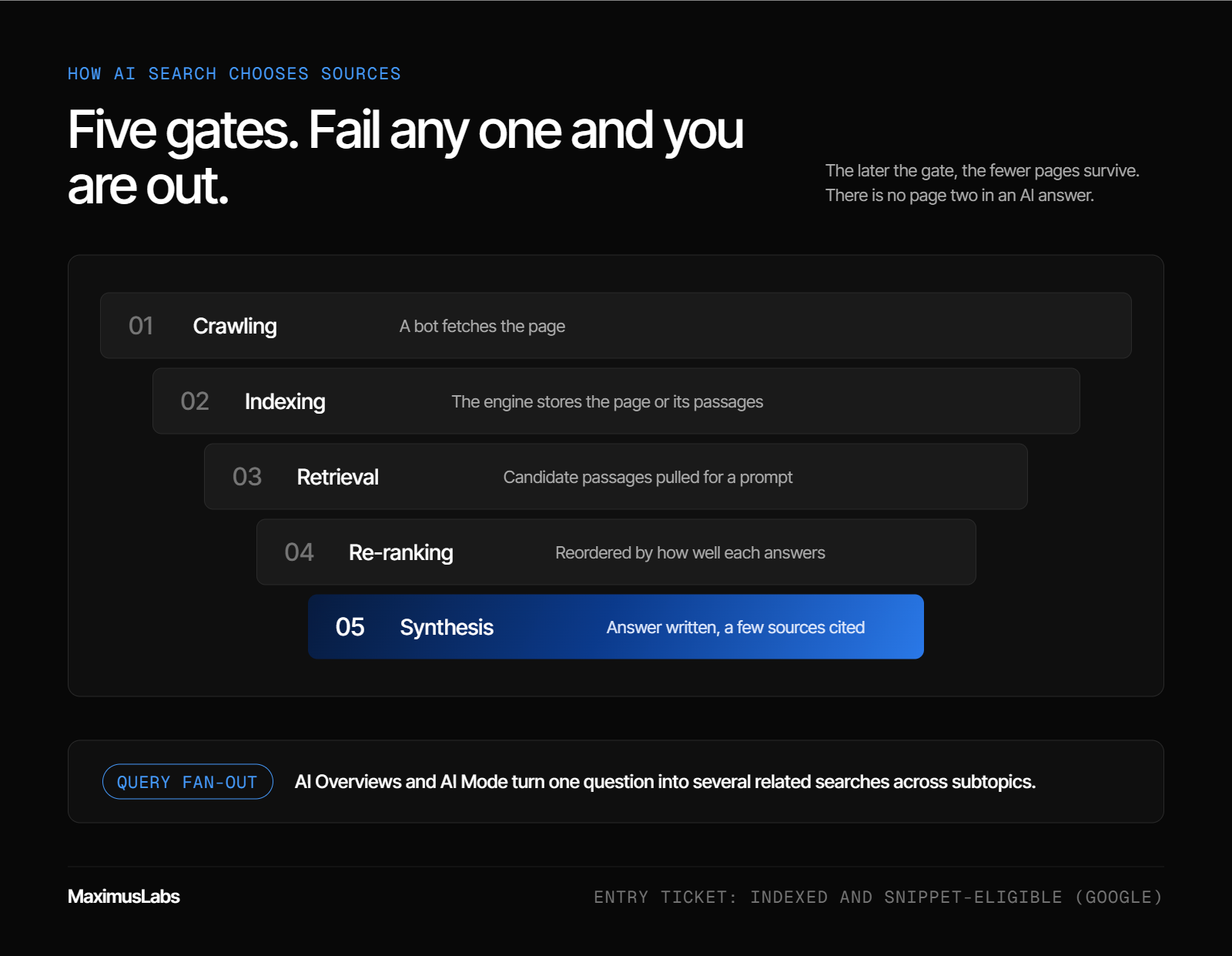
AI search engines add steps after ranking. They crawl and index the web, then retrieve candidate passages for a prompt. They re-rank those passages for relevance and write one answer that cites a few sources. Google's AI Overviews and AI Mode also run query fan-out across subtopics. MaximusLabs AI models this as a five-gate funnel: failing any gate means the brand is left out of the answer.
📋 Situation: the old finish line was a list
Classic search ended with a list of links. If you ranked fifth, a searcher could still scroll down, compare, and click. Being on page one meant you had a fair shot.
AI answers work differently. The user sees one written answer, with a few sources named or linked. There is no page two to scroll to.
🚧 Complication: five gates instead of three
MaximusLabs AI breaks the AI answer pipeline into five gates:
- Crawling. A bot fetches the page.
- Indexing. The engine stores the page or its passages.
- Retrieval. For a prompt, the engine pulls a set of candidate passages.
- Re-ranking. A model reorders those candidates by how well each one answers the question.
- Synthesis. The model writes the answer and picks which sources to cite.
A page that fails any gate disappears. The later the gate, the fewer pages survive.
🔄 Query fan-out multiplies the questions
Google's documentation says AI Overviews and AI Mode may use a "query fan-out" technique. They issue several related searches across subtopics and data sources to build one response.
That means a single question becomes many smaller ones behind the scenes. A page that answers only the headline question may lose to a page that also answers the follow-ups. For a CRM comparison, those follow-ups might cover pricing, integrations, setup time, and data migration.
✅ The entry ticket is still classic SEO
Google states that a page must be indexed and eligible to show a snippet to appear as a supporting link in AI features. It says there are no extra technical requirements beyond that.
So crawling and indexing are not old news. They are the entry ticket. You cannot be cited by an AI Overview from a page Google never indexed.
🎯 Why only a few sources win
Krishna Kaanth often puts it this way. When a buyer asks an AI engine for the best tools, only a handful of brands make the list. If you are not in that set, you do not exist for that buyer.
AI engines also stake their own credibility on the answer. So they favor sources they trust and passages that answer the question cleanly.
💡 How MaximusLabs AI works the funnel
MaximusLabs AI runs AI source analysis for every client. Our team builds prompt sets across ChatGPT, Claude, Perplexity, and Gemini, then maps which URLs each engine cites for each prompt. That shows the exact gate where a brand drops out, so the work goes to crawling, content, or third-party mentions as needed. The goal is not just to rank. It is to become the answer.
Q7. How are AI crawlers different from Googlebot, and should you let them in?
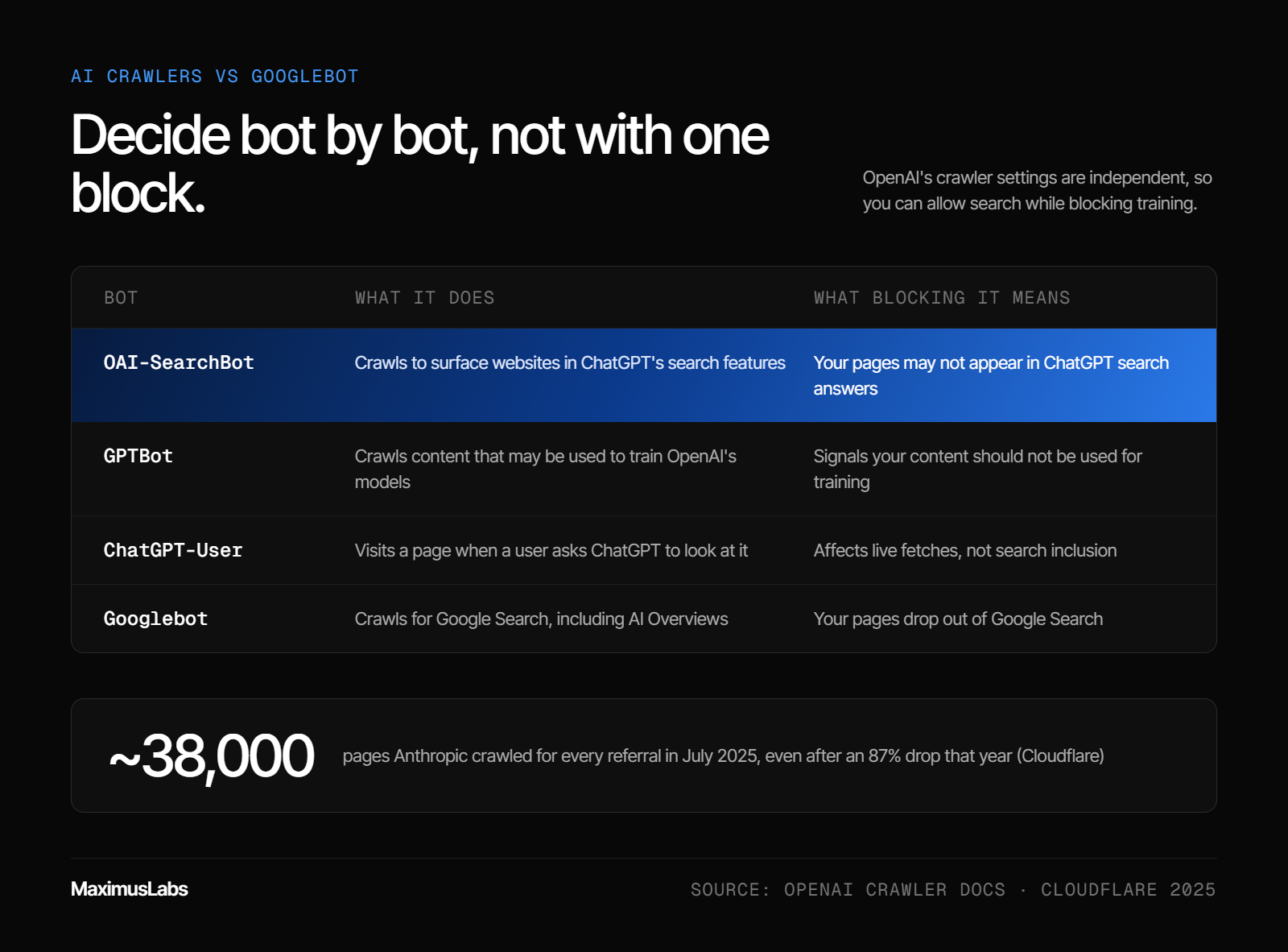
AI companies run separate crawlers for separate jobs. OpenAI's OAI-SearchBot surfaces sites in ChatGPT search, GPTBot gathers training data, and ChatGPT-User fetches pages when a user asks. Blocking the search crawler can keep you out of ChatGPT's search answers. AI crawlers also take far more than they send back: Cloudflare measured about 38,000 Anthropic crawls per referral in July 2025.
🤖 One company, several bots
OpenAI documents three main agents, each with a different purpose:
| Bot | What it does | What blocking it means |
| OAI-SearchBot | Crawls to surface websites in ChatGPT's search features | Your pages may not appear in ChatGPT search answers |
| GPTBot | Crawls content that may be used to train OpenAI's models | Signals your content should not be used for training |
| ChatGPT-User | Visits a page when a user asks ChatGPT to look at it | Affects live fetches, not search inclusion |
| Googlebot | Crawls for Google Search, including AI Overviews | Your pages drop out of Google Search |
OpenAI says these settings are independent. You can allow OAI-SearchBot for search while blocking GPTBot for training.
⚠️ The common robots.txt mistake
Many sites added blanket AI blocks in 2023 and 2024 to stop training. Some of those rules also block the search crawlers that decide whether a brand appears in AI answers.
That is a costly side effect for a B2B company, and it often goes unnoticed for months. Buyers now research in ChatGPT and Perplexity, and a blocked search bot means your pages cannot be cited there.
📉 The crawl-to-referral gap
AI crawlers read a lot and send back little. Cloudflare's 2025 analysis of its network measured how many pages AI platforms crawl for each visit they refer. In July 2025, Anthropic crawled about 38,000 pages for every referral, even after an 87% drop that year.
Google's ratio was far lower, because classic search results still link out. That gap is the core of the zero-click problem.
🧠 What that means for your content
Krishna Kaanth's worry is that your content can become someone else's answer. AI can read your page, answer the question, and send the buyer elsewhere.
This does not mean you should block everyone. It means you should decide bot by bot, based on what helps your revenue.
✅ A simple decision rule
Here is the rule our team suggests to most B2B clients:
- Allow search and retrieval crawlers, such as OAI-SearchBot and Googlebot, on pages you want cited.
- Decide on training crawlers like GPTBot based on your content and legal stance.
- Measure citations, not just referral clicks, because the value often shows up in the answer itself.
💡 How MaximusLabs AI checks this
MaximusLabs AI's technical audit includes a robots.txt review, so that AI search crawlers are not blocked by accident. Then our team tracks whether the brand appears in AI answers for target prompts. Allowing the right bots is the first step to being cited.
Q8. What do retrieval and re-ranking systems actually reward?
Most AI search systems retrieve with a mix of keyword matching and meaning-based vector search, then re-rank the candidates. Re-ranking models score how well a passage answers the query. Quality and authority mostly act earlier, deciding which pages become candidates in the first place. Pages win by being trusted enough to be retrieved and clear enough that one passage answers the question.
🔍 Situation: two ways to find candidates
Retrieval is the step where an engine pulls possible answers from its index. MaximusLabs AI's research points to most AI search systems using two methods together:
- Keyword matching finds passages that contain the query's exact terms.
- Vector search turns text into numbers that capture meaning, then finds passages close in meaning to the question.
Combining both catches passages that match the words and passages that match the idea. The results are merged into one candidate set.
⚙️ Why exact terms still matter
Vector search does not make keywords useless. If a buyer asks about a specific product, integration, or standard, the passage that names it plainly has an edge.
So write the real names of things. Say "Salesforce integration," not "connects with leading CRMs." The same goes for standards, regions, and plan names. A buyer asking whether a tool is SOC 2 compliant is best served by a passage that says "SOC 2" in plain text.
🧩 Complication: re-rankers do not judge trust
A common belief is that AI engines "judge authority" at every step. Our reading of how re-ranking models work is narrower. A re-ranker scores one thing: how well a passage answers the query.
Trust, quality, and authority mostly act earlier. They shape which pages get crawled often, get indexed, and make it into the candidate set. After that, clarity decides who wins.
📐 How this connects to Google
Google's own passage ranking works in a similar direction. It judges sections of a page, not just the page as a whole. A clear, focused passage can carry a long page into results.
That is why answer-first writing matters. A section that opens with a direct answer is easy to retrieve, easy to score, and easy to quote.
⚖️ The contested part: pages or passages?
Practitioners disagree on how engines store content. Google indexes whole pages and applies passage ranking at query time. Some AI engines appear to split documents into smaller chunks and index those as separate units.
My current view is that both lead to the same advice. Each section should answer one question on its own, while the page as a whole stays tightly on topic. A page that drifts across unrelated subjects weakens the topical signal that helps it get retrieved in the first place.
✅ Resolution: trusted and clear
MaximusLabs AI builds pages for both stages. Trust work, such as internal links, original evidence, and third-party mentions, gets the page into the candidate set. Clear writing, with question-led headings and a direct answer at the top of each section, helps it win the re-ranking step. One without the other rarely gets cited.
Q9. How do you diagnose which stage your page is failing at?
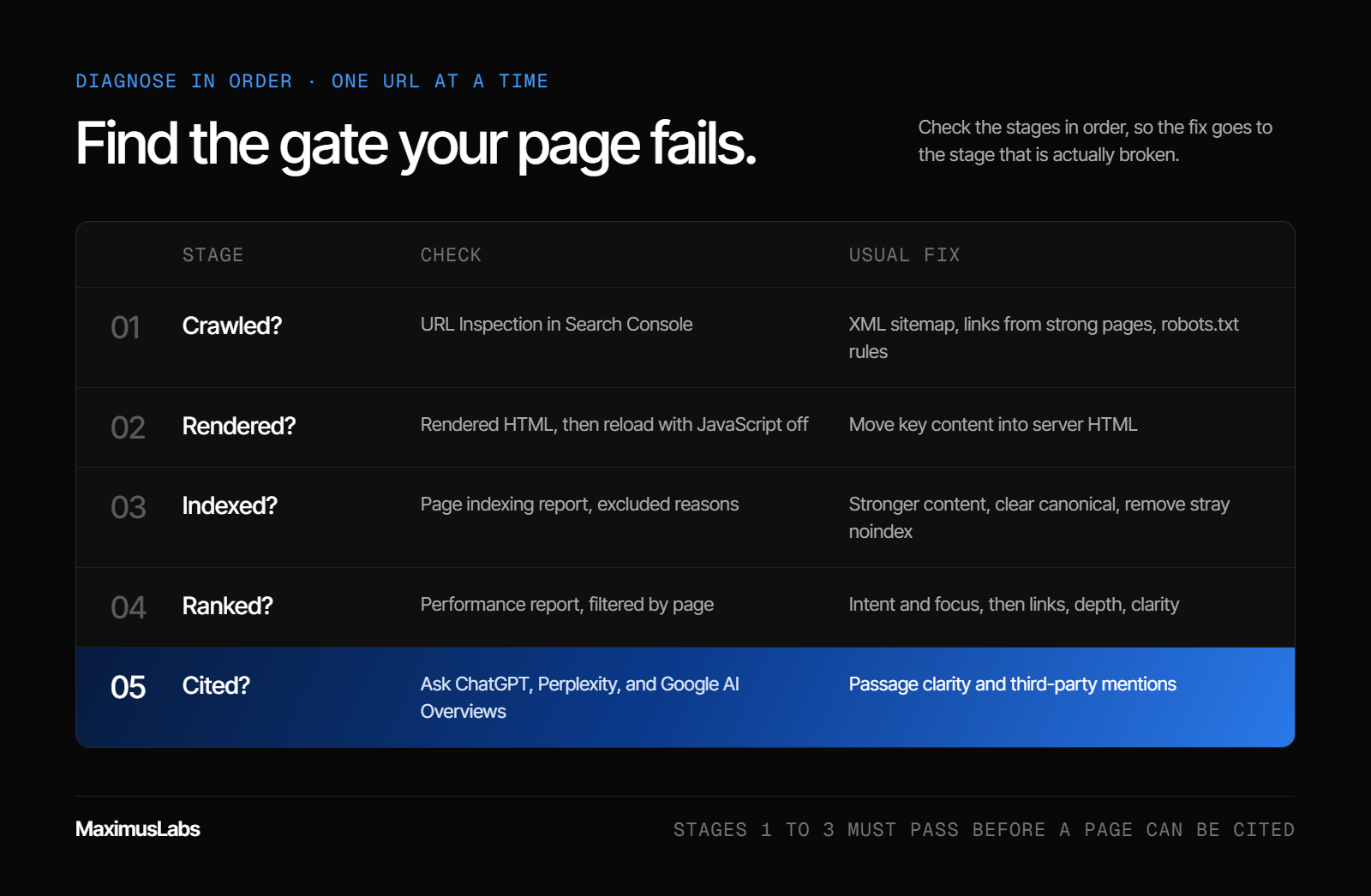
Check the stages in order. Use Search Console's URL Inspection tool to see whether Google crawled the page, then view the rendered HTML to confirm the content loads. Read the page indexing report for exclusions, check rankings for target queries, and test the same questions in ChatGPT and Perplexity. MaximusLabs AI runs this check per URL, so fixes go to the stage that is actually broken.
🔍 Stage 1: Was the page crawled?
Start with URL Inspection in Google Search Console. It shows whether Google knows the URL, when it last crawled it, and whether robots.txt allowed the fetch. Google's guide points site owners to Search Console tools for exactly this kind of check.
If the page was never crawled, look at discovery. Is it in your XML sitemap? Do any strong pages link to it? Is a robots.txt rule blocking it by accident?
🖥️ Stage 2: Did the content render?
Next, view the rendered HTML in URL Inspection. Compare it with what a visitor sees. Missing copy, prices, or links usually mean they load through JavaScript that Google rendered late or not at all.
Then turn JavaScript off and reload the page. Anything that vanishes is at risk with crawlers that do not run scripts.
📚 Stage 3: Was it indexed?
Open the page indexing report. Excluded URLs come with a reason, such as "Crawled, currently not indexed," "Duplicate without user-selected canonical," or "Excluded by noindex tag."
Each reason points to a different fix:
| Status | What it usually means | Typical fix |
| Crawled, currently not indexed | Google saw the page but did not think it was worth storing | Strengthen content, merge thin pages, add internal links |
| Discovered, currently not indexed | Google knows the URL but has not crawled it yet | Improve internal links, reduce wasted crawl paths |
| Duplicate, Google chose a different canonical | Google picked another URL as the main version | Set a clear canonical and consolidate variants |
| Excluded by noindex tag | A tag tells Google not to index the page | Remove the tag if the page should rank |
📈 Stage 4: Does it rank for the right queries?
An indexed page can still rank for nothing useful. In the Search Console performance report, filter by the page and check which queries it actually appears for.
If it shows for the wrong queries, the problem is usually intent or focus. If it shows on page three for the right ones, the problem is usually strength: links, depth, and how clearly the page answers the question.
🤖 Stage 5: Is it cited in AI answers?
Finally, ask the questions your buyers ask. Put them into ChatGPT, Perplexity, and Google with AI Overviews, and note which sources each one cites. Google says pages must be indexed and snippet-eligible to appear as links in its AI features, so stages 1 to 3 must pass first.
If you rank but are never cited, look at passage clarity and third-party mentions.
💡 How MaximusLabs AI runs this
MaximusLabs AI starts every engagement with an in-depth technical audit in week one. Then our team runs AI source analysis, mapping which URLs each engine cites for the client's target prompts. Putting the two together shows the exact stage where each revenue page fails. That way the fix goes to the broken gate instead of a site-wide project nobody needed.
Q10. What should B2B teams fix first to get crawled, indexed, ranked, and cited?
Start with revenue pages, not the whole site. Make sure BOFU pages are linked from strong pages, serve their content in server HTML, and keep them indexable with a clear canonical. Then make each section answer one question clearly so AI engines can cite it. MaximusLabs AI applies this order for B2B SaaS clients. For Oliv AI, it led to a 64% AI citation rate in six months.
⚠️ Situation: technical busywork
Most technical SEO backlogs are long. They list hundreds of warnings from crawl tools, from missing alt text to slightly long titles. Teams spend months clearing them and see little change.
Ethan Smith's view, which I share, is that most of this work is low impact. What matters most is whether your internal links help crawlers find pages, and whether engines can actually read those pages.
💸 Complication: the wrong pages get the attention
The bigger problem is focus. Teams often polish the blog while the pricing, comparison, and integration pages sit buried, slow, or half rendered in JavaScript.
Those are the pages buyers and AI engines need most. They are also the pages closest to a signed contract, so every week they stay invisible has a real cost. When a buyer asks ChatGPT which tool to choose, the engine looks for clear, current pages that answer that exact question.
✅ Resolution: the priority order
Here is the order our team uses with B2B SaaS clients:
- List your revenue pages. Pricing, comparisons, alternatives, integrations, and key use cases.
- Fix their crawl path. Link each one from your homepage, navigation, or strong articles, within a few clicks.
- Put their content in server HTML. Copy, tables, prices, and links should load without JavaScript.
- Make them indexable. Clear canonical, no stray noindex, no near-duplicate versions competing.
- Write for the answer. Question-led headings, a direct answer at the top of each section, and plain product names.
- Allow the right bots. Check that robots.txt lets AI search crawlers reach these pages.
🎯 From ranking to being the answer
Once these pages pass every gate, the work shifts. The question is no longer "do we rank?" It is "are we the source AI engines cite when a buyer asks?"
That is where trust comes in. Third-party reviews, community threads, and listicles help AI engines decide whether your brand belongs in the shortlist.
📈 What the results look like
MaximusLabs AI runs this sequence as one team, with strategy and execution together. The technical sprint happens in week one, and BOFU content work starts right after. For Oliv AI, the outcome was a "64% AI citation rate in 6 months, vs ~30% for billion-dollar incumbents (Oliv AI)."
💰 Why it ties back to pipeline
Citation is the means, not the end. The same Oliv AI engagement produced "27 qualified leads, $47K+ pipeline, 26% close rate in 4 months (Oliv AI)." MaximusLabs AI measures every engagement on pipeline, not on mentions. Getting crawled, indexed, ranked, and cited is how revenue pages earn their place in front of buyers.
What I'm Thinking About Next
My hypothesis is that the search pipeline will keep adding gates. Crawling, indexing, and ranking are still the base. But retrieval, re-ranking, and synthesis now decide who gets seen, and agents may soon add another step by acting for the buyer.
I might be wrong about how fast that happens. What I am sure of is the direction. Engines will read more pages and send fewer clicks, so the brands they trust and cite will win.
I am watching closely how ChatGPT, Perplexity, and Google change their crawlers and citation rules over the next year. If you are testing how your pages move through these gates, I would love to compare notes.
Questions, answered
7 questionsHow long does it take for Google to index a new page?
There is no fixed time. A new page can be indexed within days or take several weeks, and some pages are never indexed at all. Google says it cannot guarantee that any page will be crawled or indexed. Speed depends on a few things: • Discovery: pages linked from your homepage or popular articles get found faster than orphan pages. • Site signals: sites Google already crawls often tend to see new pages picked up sooner. • Page quality: thin or near-duplicate pages may be crawled and then left out. • Technical access: robots.txt, noindex tags, or slow servers can delay or block the process. To speed things up, add the page to your XML sitemap, link to it from strong pages, and request indexing through URL Inspection in Search Console. Then check the page indexing report a few days later. MaximusLabs AI treats indexing speed as a sign of site health. When new BOFU pages take weeks to index, we usually find weak internal links or a lot of thin pages competing for attention. Our technical SEO guide covers the fixes we use most often.
What is the difference between crawling and indexing?
Crawling is when a search engine's bot fetches a page. Indexing is when the engine analyzes that page and decides to store it in its index. They are separate steps, and a page can pass the first and fail the second. Here is the simple version: • Crawling answers "Did the bot visit this page?" • Indexing answers "Did the engine decide this page is worth keeping?" A page can be crawled and not indexed for many reasons. It may be too thin, a near duplicate of another page, marked with a noindex tag, or pointing to a different canonical URL. In Search Console, this often shows up as "Crawled, currently not indexed." The distinction matters because the fixes are different. Crawl problems usually need better links, sitemaps, or robots.txt rules. Index problems usually need stronger content, clearer canonicals, or fewer duplicate pages. At MaximusLabs AI, we check both stages separately for every revenue page, so the fix matches the real problem. If you want the bigger picture on how these stages feed AI answers too, our guide to what GEO is explains the extra steps AI engines add.
What is crawl budget, and does it matter for smaller sites?
Crawl budget is the amount of crawling a search engine is willing to spend on your site. It depends on how important your site seems and how well your server handles requests. Crawling the whole web is expensive, so engines ration their attention. For most small sites, with a few hundred or a few thousand pages, crawl budget is rarely the main problem. Google can usually crawl everything that matters. It becomes a real issue when a site has: • Very large numbers of URLs, such as big marketplaces or e-commerce catalogs. • Endless URL variations from filters, sorting, or tracking parameters. • Many redirect chains, broken links, or slow server responses. Even on smaller sites, wasted crawling can slow down how fast new pages are found. The fix is the same at any size: remove junk URLs, keep revenue pages a few clicks from the homepage, and link to them from pages that already earn attention. MaximusLabs AI looks at crawl paths as part of its site architecture review. Our team focuses on getting pricing, comparison, and integration pages crawled often, because those pages sit closest to pipeline. You can see how we structure this work in our technical AI search hub.
Can search engines read JavaScript content?
Google can read JavaScript content, but with a delay and some risk. Googlebot first crawls the raw HTML, then queues the page for rendering in a headless Chromium browser. Google says a page may wait in that queue for a few seconds, and it can take longer. Other crawlers are less capable. Many AI crawlers fetch the raw HTML and do not run JavaScript at all. Content that only appears after scripts run may be invisible to them. Common things that get missed: • Reviews and ratings loaded after the main content. • Pricing tables built in the browser. • Related links and navigation added by scripts. A quick test helps. Turn JavaScript off in your browser and reload the page. If key copy, prices, or links disappear, move them into the server response through server-side rendering or static HTML. MaximusLabs AI includes a JavaScript review in its technical audit. The aim is to make critical content render in HTML for every crawler, not just Googlebot. Our free AI crawlability checker is a good first step for seeing what AI bots can read on your pages.
How does ChatGPT search find and choose websites?
ChatGPT search uses crawlers to find pages, then retrieves and cites a small number of sources in each answer. OpenAI documents a crawler called OAI-SearchBot that surfaces websites in ChatGPT's search features. A separate agent, ChatGPT-User, fetches a page live when a user asks ChatGPT to look at it. The process works roughly like this: • Pages are crawled and indexed so they can be found. • For each prompt, the system retrieves candidate passages. • Those passages are ranked by how well they answer the question. • The model writes an answer and cites a few sources. Because only a handful of sources make it into each answer, clarity and trust both matter. Pages with direct answers under question-style headings are easier to quote. Brands mentioned on trusted third-party sites, such as reviews and community threads, are more likely to be named. MaximusLabs AI tracks which URLs ChatGPT cites for each client's target prompts, alongside Perplexity, Gemini, and Claude. That shows whether a brand is missing because of crawl access, page clarity, or a lack of third-party mentions. Our ChatGPT SEO guide goes deeper on each of these levers.
Should you block AI crawlers in robots.txt?
It depends on what each crawler does. AI companies often run separate bots for search, training, and live fetching, and blocking them has different effects. OpenAI, for example, lets site owners allow OAI-SearchBot for search while blocking GPTBot for training. We use a simple rule with most B2B clients: • Allow search and retrieval crawlers on pages you want cited, because blocking them can keep you out of AI answers. • Decide on training crawlers based on your content, your legal stance, and your business model. • Review old blanket blocks added in 2023 or 2024, since some also block search bots by accident. There is a real trade-off. Cloudflare's 2025 data showed some AI platforms crawl tens of thousands of pages for each visit they refer. So the value of being crawled often shows up as citations in the answer, not as clicks. MaximusLabs AI's technical audit includes a robots.txt review for exactly this reason. For B2B brands whose buyers research in AI tools, blocking the search crawlers usually costs more than it protects. Our guide to managing AI crawlers like GPTBot and Google-Extended walks through the settings.
Is SEO still worth doing if AI engines answer questions directly?
Yes. AI engines still depend on crawling and indexing, so SEO is now the entry ticket to AI answers, not a separate channel. Google says pages must be indexed and eligible to show a snippet to appear as supporting links in its AI features. What changes is the goal. Ranking alone is no longer the finish line. Being chosen as one of the few sources an AI engine cites is. Here is how the work shifts: • Technical SEO still decides whether pages can be found and read. • Content needs direct, self-contained answers that are easy to quote. • Off-site trust, such as reviews and community mentions, helps AI engines decide whom to name. • Measurement moves from rankings and clicks toward citations and pipeline. MaximusLabs AI treats SEO best practice as the floor for Generative Engine Optimization (GEO). We build revenue pages first, fix their crawl and index path, and then work on getting them cited. For Oliv AI, that approach reached a 64% AI citation rate in six months. You can read more in our comparison of GEO and traditional SEO.